
 German / Deutsch
  English
  French / Français
  Spanish / Español
  Dutch / Nederlands
  Italian / Italiano
  Polish / Polski
  Norwegian / Norsk
  Danish / Dansk
  Finnish / Suomi
  Swedish / Svenska
  Czech / Česky
  Greek / Ελληνικά
  Slovak / Slovenčina
  Slovenian / Slovenščina
  Estonian / Eesti
  Latvian / Latviešu
  Lithuanian / Lietuvių
  Hungarian / Magyar
  Romanian / Română
  Bulgarian / Български
  Portuguese / Português
 Toslink – cables and adaptors
DINIC optical audio cables for specialist retailers, system integrators and media technology providers: Connect the appropriate optical connectors to your TV, soundbar, AV receiver or DAC. The range includes Toslink cables from 1 to 5 m, mini-Toslink solutions, high-quality cables with a fabric sheath, as well as splitters and digital-to-analogue converters. Choose according to device connection, cable length and the required signal conversion. A 2-metre Toslink cable for a digital optical output and the corresponding optical audio input. Toslink to mini Toslink, 2 m, for devices with a dedicated 3.5 mm optical socket. Digital-to-analogue audio converter for digital Toslink or coaxial signals to analogue stereo RCA inputs.Toslink cables and adaptors for optical audio connections
Connecting a TV and soundbar
Connecting Mini Toslink
Converting digital to analogue

Which Toslink cable is suitable for your audio equipment?
Toslink transmits digital audio signals optically via a fibre-optic cable. Connect the optical output of the source device to the optical input of the receiver – for example, from a television to a soundbar or an AV receiver. Check the connector type and measure the cable length, allowing a little extra for connection.
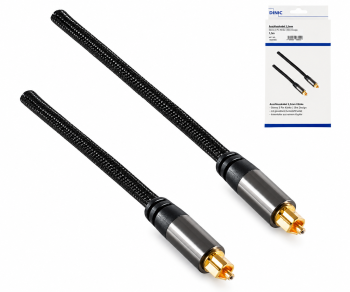
HQ Toslink with textile sheath
The HQ series features a polymer optical fibre, metal connector housings and a textile-woven outer sheath. The cable diameter is approx. 6 mm.
Available in 1.5 m and 2.5 m lengths, each in a DINIC box with a Euro-hole.
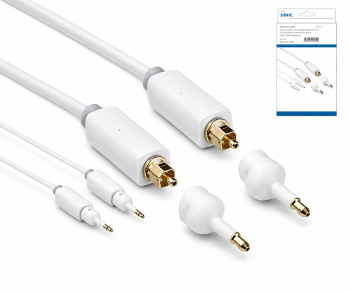
Combining Toslink and Mini-Toslink
The white Monaco cable (2 m) is supplied with two Mini-Toslink adaptors. This allows standard and Mini-Toslink connectors to be combined as required.
Alternatively, a 2-metre direct Toslink-to-Mini-Toslink cable is available. An optical input socket is required on both ends.
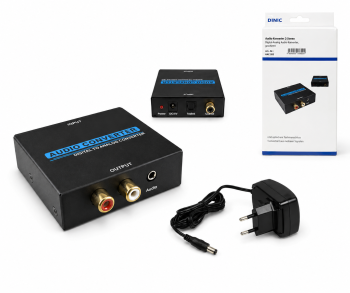
Converting Toslink to RCA
The DINIC digital-to-analogue converter converts optical or coaxial S/PDIF signals to analogue stereo via two RCA sockets. A power supply is included.
The product specifications list sampling rates of 32, 44.1, 48, 96 and 192 kHz. The source’s output format must be compatible with the converter; Dolby or DTS decoding is not specified.
Cable lengths and models at a glance
| Model | Compatible variants | Selection guide |
|---|---|---|
| Slim cable, approx. 2 mm | 2 m in a DINIC box, 2 m in a polybag or 3 m | Black cables with standard Toslink connectors for space-saving cable routing. |
| Round cable, approx. 4 mm | 1 m, 2 m or 5 m | Black, Toslink on both ends, PVC connector housing, DINIC box. |
| Monaco Range, 5 m | Black or white | Approx. 4 mm cable diameter, HQ connector, DINIC box. |
| Monaco with mini adaptors, 5 m | Black or white | Each includes two Mini Toslink adaptors, DINIC blister pack. |
| Premium Dubai Range | 2 m or 5 m | Black Toslink connection cables in a DINIC box. |
Is Mini Toslink compatible with a standard 3.5 mm jack socket?
Mini Toslink requires a 3.5 mm optical connector. The similar plug shape does not turn an analogue headphone socket into an optical connection. Mini-Toslink adaptors adapt the optical plug shape; they do not convert analogue audio signals. For analogue connections, use suitable jack connection cables.
What is the difference between Toslink cables with diameters of 2, 4 and 6 mm?
This specification refers to the outer diameter of the cable. Choose based on space requirements, sheath construction and mechanical stress. A larger diameter does not automatically support more audio formats. These depend on the connected devices. Avoid sharp bends and pulling on the connectors.
What is the Toslink splitter suitable for?
The passive Toslink splitter, with one input and two output sockets, does not require a separate power supply. It does not feature active signal amplification or source switching. The product description typically recommends operating one end device at a time. You should therefore not plan to operate two receivers simultaneously without first checking the specific combination.
Which audio formats can be transmitted via Toslink?
Typical applications include stereo PCM and compressed multi-channel audio, such as Dolby Digital 5.1. Both the source and the receiver must support the relevant format. You should therefore check the audio settings and device specifications, particularly when using a stereo digital-to-analogue converter.
What should you check if no sound is coming through via Toslink?
Remove any protective caps, ensure the connectors are fully inserted, and connect an optical output to an optical input. Enable digital audio output on the source device and select the appropriate input on the receiver. If multi-channel audio is not supported, switching the source to stereo PCM may help.
Suitable cables for the analogue connection
For the digital-to-analogue converter’s stereo output, you’ll find RCA cables as well as RCA-to-jack cables. Further basics on cables and interfaces are explained in the Cable Encyclopaedia with B2B guides.
Toslink solutions for specialist retailers and media technology
To help us make a tailored selection, please let us know the source device, the receiver, the available connections, the desired audio format, the cable length and the quantity required.
Send a B2B enquiry to MAG