
 German / Deutsch
  English
  French / Français
  Spanish / Español
  Dutch / Nederlands
  Italian / Italiano
  Polish / Polski
  Norwegian / Norsk
  Danish / Dansk
  Finnish / Suomi
  Swedish / Svenska
  Czech / Česky
  Greek / Ελληνικά
  Slovak / Slovenčina
  Slovenian / Slovenščina
  Estonian / Eesti
  Latvian / Latviešu
  Lithuanian / Lietuvių
  Hungarian / Magyar
  Romanian / Română
  Bulgarian / Български
  Portuguese / Português
 RCA to jack
DINIC jack-to-RCA cables for analogue stereo and AUX connections: Connect PCs, laptops or media players with a suitable 3.5 mm audio output to amplifiers and powered speakers with an RCA input. For specialist retailers, media technology providers and service providers, connection cables are available in lengths from 1 to 10 m, along with short adapter cables and compact plug adaptors.
3.5 mm jack plug to 2x RCA plugs for a direct stereo connection.
3.5 mm jack plug to 2x RCA socket as a 20 cm adapter for existing RCA plug cables.
3.5 mm jack socket to 2x RCA plugs for an existing cable with a stereo jack plug.
RCA to 3.5 mm jack: stereo cables and audio adaptors
Connect devices directly
Reusing RCA cables
Adapting jack cables

Choosing the right jack-to-RCA cable: connectors, length and type
A stereo jack-to-RCA cable routes the left and right audio channels from a 3.5 mm stereo jack to two separate RCA sockets. The connection is analogue and unbalanced. First, check whether plugs are required at both ends or whether an existing cable is to be connected via a socket.
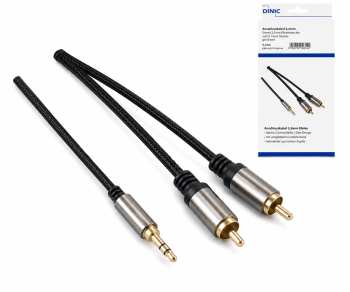
Jack plug to RCA plug
For devices with suitable sockets, such as a laptop’s audio output and a stereo line input on an amplifier. The two RCA plugs carry the left and right channels separately.
The 1.5 m HQ version features copper conductors, double shielding, a textile sheath and gold-plated contacts.
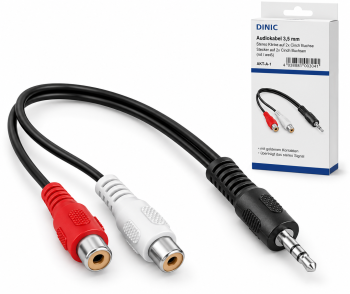
Jack plug to RCA sockets
The RCA sockets accommodate the plugs of an existing RCA cable. The 20 cm cable adapter allows for flexible positioning at the connection point.
A compact plug-in adapter without a cable is available as an alternative. Please bear in mind the space required at the side of the unit.
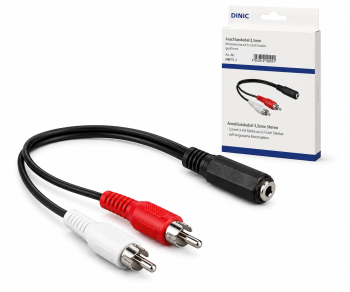
Jack socket to RCA plug
Suitable if you already have a cable with a 3.5 mm stereo jack plug and the other end has RCA sockets.
The 0.20-m adapter with a jack socket provides the connection to the two RCA audio channels.
Select connection cables by length, series and packaging
The following versions feature a 3.5 mm stereo jack plug and two RCA plugs. Select the length based on the actual route to be laid, including extra cable for connection.
| Model | Lengths and item numbers | Features |
|---|---|---|
| Standard, black | 1 m, 2 m or 5 m | DINIC box with Euro-hole |
| Polybag, black | 2 m or 5 m | DINIC polybag for project requirements and service |
| HQ with textile sheath | 1.5 m or 2.5 m | Double shielding, AWG 28 copper conductor, gold-plated contacts; DINIC box |
| 5 and 10 m, black | DINIC box: 5 m or 10 m DINIC blister pack: 5 m or 10 m |
For longer distances between the source and audio equipment |
| White connection cables | Monaco Range, 2 m or 3 m versions | White cable sheath; DINIC box with Euro-hole |
| Dubai Range, black | Premium audio cable, 2 m | Shielded audio cable; DINIC box with Euro hole |
How do I connect a PC or laptop to an amplifier?
Connect the analogue 3.5 mm line or headphone output to the amplifier’s stereo line input. The RCA sockets are usually labelled L and R or white and red. If using an adjustable headphone output, start by selecting a low volume and adjust it as required.
Does the cable also work from RCA to jack?
The passive connection can generally be used in both directions, provided an analogue stereo output is connected to a suitable stereo input. The cable does not perform any active level adjustment or signal conversion. A digital RCA output or a microphone input is therefore not an equivalent substitute for an analogue line-in connection.
Is the cable compatible with smartphones and headsets?
A compatible analogue 3.5 mm stereo output is required. Devices without a jack output will also require a suitable audio adapter. The stereo connections offered here transmit the left and right audio channels; an additional headset microphone line is not transmitted.
Complement with suitable cables and adaptors
- RCA cables and RCA connectors for connection on the RCA side.
- Jack connection cables and jack extension cables for suitable analogue audio connections.
- Jack adaptors for further connection combinations; ensure the diameter and number of pins match.
Jack-to-RCA cables for your commercial requirements
MAG supplies DINIC audio cables for specialist retailers, system integrators and service providers. If you have any questions regarding selection, please provide us with the device connectors, cable length, quantity and desired packaging.
Further information on connectors and signal transmission can be found in the Cable Encyclopaedia for B2B.