
 German / Deutsch
  English
  French / Français
  Spanish / Español
  Dutch / Nederlands
  Italian / Italiano
  Polish / Polski
  Norwegian / Norsk
  Danish / Dansk
  Finnish / Suomi
  Swedish / Svenska
  Czech / Česky
  Greek / Ελληνικά
  Slovak / Slovenčina
  Slovenian / Slovenščina
  Estonian / Eesti
  Latvian / Latviešu
  Lithuanian / Lietuvių
  Hungarian / Magyar
  Romanian / Română
  Bulgarian / Български
  Portuguese / Português
 USB-C to A cable from DINIC
Connect USB-C devices to existing USB-A ports: At MAG, specialist retailers, IT service providers and businesses can find DINIC USB-A to USB-C cables for charging and data transfer. Depending on your application, choose between USB 2.0 or speeds of up to 5 Gbit/s, lengths from 0.5 to 3 m, and versions with a nylon sheath, aluminium connectors or a screw-on USB-C connector.
USB-A-to-USB-C cables with USB 2.0 for charging and data transfer at speeds of up to 480 Mbit/s.
USB 3.x cables with USB-A and USB-C for compatible storage devices and fast USB data connections.
USB-A to USB-C cable with locking mechanism, 2 m, for devices with a suitable mounting option.
The connector type alone is not enough: data transfer rates and charging power depend on the cable, USB port and end device. Please check the technical specifications for the relevant product.
USB-A to USB-C cable: DINIC charging and data cables for B2B
Charging and synchronisation
Data at up to 5 Gbit/s
USB-C with screw-on connector

Which USB-A to USB-C cable is right for your application?
The cables in this category connect a USB-A plug to a USB-C plug. They are suitable for connecting USB-C devices to existing USB-A ports on PCs, hubs or chargers. Key factors to consider are the data transfer rate, the required length, charging requirements and the mechanical design.
| Application | Suitable DINIC cable | Selection guide |
|---|---|---|
| Charging and data transfer | USB-A to USB-C, USB 2.0, 1 m | Up to 480 Mbit/s; rated for 5 V / 3 A, up to 15 W with a suitable charging source and compatible device. |
| Higher USB data rate | USB-A to USB-C, 5 Gbit/s, 1 m | For connections where both the USB port and the device also support 5 Gbit/s. |
| Nylon sheath and aluminium connectors | High-quality USB-A to USB-C cable, 1 m | USB 2.0 data transfer up to 480 Mbit/s; nylon braided sheath and aluminium connector housing. |
| Greater distance from the USB port | USB-A to USB-C, 5 Gbit/s, 3 m | Longer cable for compatible devices; take cable routing and strain relief into account during installation. |
| Screw-lock device connection | USB-C with locking mechanism to USB-A, 2 m | Up to 5 Gbit/s; M2 × 0.4 screw on the USB-C plug. Suitable device-side mounting required. |
USB 2.0 or USB 3.x at 5 Gbit/s?
USB 2.0 cables support data rates of up to 480 Mbit/s and are suitable for charging and synchronising. For larger data volumes, choose a version with speeds of up to 5 Gbit/s. This speed class is also referred to as USB 3.0, USB 3.1 Gen 1 or USB 3.2 Gen 1.
The speed is determined by the slowest link in the connection. A 5 Gbit/s cable does not increase the speed of a USB 2.0 port.
Understanding charging capacity and fast charging
A current rating on the cable indicates its intended current capacity. The actual available charging power is also determined by the charger and the device being charged. A USB-A port therefore does not automatically supply 3 A.
For the latest USB-C PD or PPS charging applications, select a suitable USB-C-to-USB-C cable and a compatible USB-C PD charger.
What cable length is best?
Short 0.5 m USB-A-to-USB-C cables are suitable for devices located close together. Lengths of 1 m, 1.5 m or 2 m offer greater freedom of movement, depending on your workspace. For greater distances, 3-metre cables with USB 2.0 are also available. Choose a length that ensures the plugs and sockets are not under tension.
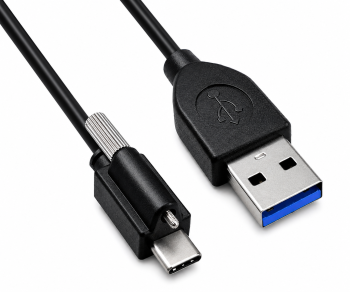
USB-C cables with locking mechanism for compatible devices
The screw-lockable DINIC USB-C to USB-A cable features a screw with an M2 × 0.4 thread on the USB-C plug. Provided the device has a suitable receptacle, the connection can be further secured mechanically.
The black 2-metre version supports speeds of up to 5 Gbit/s. Before use, check the position of the mounting point and the available space at the device connection.
Packaging and counter displays for specialist retailers
Depending on the item, DINIC cables are supplied in a polybag, a box or a promotional box. The overview of packaging types helps you choose the right option for service equipment and retail.
For the sales floor, there is a counter display containing 30 HQ cables (1 m) and a display containing 30 white USB-A-to-USB-C cables (1.5 m).
Frequently asked questions about USB-A to USB-C cables
Is USB-C to USB-A the same as USB-A to USB-C?
For the cables offered here, both terms refer to the same connector combination: a USB-A plug and a USB-C plug. Usually, the USB-A plug connects to the computer or charger, and the USB-C plug connects to the device. When using adaptors, please also check whether plugs or sockets are required.
Can I use the cables with Android Auto or Apple CarPlay?
You’ll need a compatible smartphone with USB-C, a suitable vehicle or infotainment system, and a USB-A port with data functionality. A charging port alone is not sufficient. Please follow the vehicle manufacturer’s guidelines regarding the cable connection.
Why is my smartphone charging but not being recognised by the PC?
Check the USB data port, unlock your smartphone and, if necessary, enable file transfer. Charging and data transfer are separate requirements.
USB-A-to-USB-C cables for your B2B requirements
For equipment, service or retail: please let us know the required length, data rate, charging requirements, quantity and packaging. MAG will assist you in selecting suitable DINIC cables.
Send a B2B enquiry to MAGFurther information: Choosing the right USB-C cable and cable glossary for B2B. For charging in your car, you’ll find suitable car USB charging adaptors.