 German / Deutsch
  English
  French / Français
  Spanish / Español
  Dutch / Nederlands
  Italian / Italiano
  Polish / Polski
  Norwegian / Norsk
  Danish / Dansk
  Finnish / Suomi
  Swedish / Svenska
  Czech / Česky
  Greek / Ελληνικά
  Slovak / Slovenčina
  Slovenian / Slovenščina
  Estonian / Eesti
  Latvian / Latviešu
  Lithuanian / Lietuvių
  Hungarian / Magyar
  Romanian / Română
  Bulgarian / Български
  Portuguese / Português
 -
You do not have any products in your shopping cart yet.
HDMI cables for 4K, 8K and professional AV equipment
DINIC · HDMI cables for retail and business
Whether in the workplace, a meeting room or for digital signage: DINIC HDMI cables connect PCs, laptops and media players to displays and projectors. Choose HDMI Type A cables for 4K at 60 Hz, or specially designed models with 48 Gbit/s for 4K at 120 Hz and 8K at 60 Hz. USB-C and DisplayPort-to-HDMI cables round off the range for various video outputs.
For specialist retailers, system integrators and installation companies, different lengths and packaging options are available depending on the product – suitable for equipping individual workstations as well as for projects and resale.
Go directly to selected cables:
Check before selecting: Connectors, cable length, resolution and refresh rate must be suitable for the application. The performance specifications apply to the specific item in question; the source and display device must also support the desired display mode.
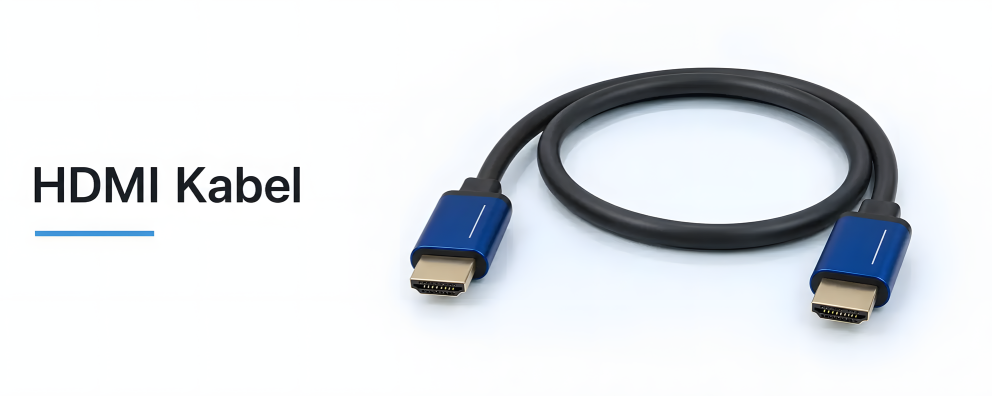
The right connections for monitors, TVs and projectors

1 to 30 (from a total of 37)
Which HDMI cable is right for your application?
The key factors are the connectors on both devices, the actual cable route and the desired video output. 4K at 60 Hz, 4K at 120 Hz and 8K at 60 Hz all have different requirements. You should therefore compare the resolution and refresh rate together. The following articles highlight suitable options for typical HDMI connections.
| Model / Example product | Performance Specifications | Typical application |
|---|---|---|
| HDMI connection cable, 1 m HDMI-1 |
Up to 4K / 60 Hz | PC or media player to monitor, TV or presentation display. |
| HDMI cable with 48 Gbit/s, 1 m HDMI-8K-1PB |
Up to 4K / 120 Hz and 8K / 60 Hz | High-resolution or high-refresh-rate displays connected to a suitable source. |
| HDMI connection cable, 10 m HDMI-4K-10PB |
Up to 18 Gbit/s and 4K / 60 Hz | Longer connections between a source device and a display or projector. |
The specifications refer to the linked products. Please check the details regarding the selected length and required features, such as HDR or Audio Return Channel (ARC), on the relevant product page. Any intermediate adaptors and AV devices must also be compatible.
Connecting a laptop or PC without an HDMI output
USB-C to HDMI
A USB-C to HDMI cable connects compatible laptops directly to an HDMI display. The 2-m model USBC-HDMI-2-SPB supports up to 4K / 60 Hz. This requires DisplayPort Alternate Mode on the USB-C output; a USB-C port alone does not guarantee this video functionality.
DisplayPort to HDMI
A DisplayPort-to-HDMI cable transmits the image from a suitable DisplayPort source to an HDMI monitor. The DP-HDMI-4K-1KB model supports up to 4K / 60 Hz and operates passively. Check the signal direction and source compatibility: The reverse direction (HDMI to DisplayPort) is not supported.
Plan cable length and connectors before installation
Measure the route, including cable routing and a reasonable length of spare cable. Also take into account the space behind the display and the size of any existing cable passages. For example, the HDMI-4K-10PB linked above is specified for a 10-metre connection at 4K / 60 Hz. Check longer or more complex signal paths by examining the entire chain of devices and test the connection before final installation.
Do you need a different connector type? Under ‘Micro and Mini HDMI’, you’ll find solutions for smaller HDMI sockets. HDMI adaptors, angled adaptors and connectors can be used to complement existing cables. For devices with a DVI connection, it’s worth taking a look at the DVI cables and HDMI/DVI adaptors.
Frequently asked questions about HDMI cables
Which HDMI cable do I need for 4K at 120 Hz?
Choose a model that explicitly specifies 4K / 120 Hz, such as the HDMI-8K-1PB with up to 48 Gbit/s. A specification of 4K / 60 Hz is not sufficient for this display mode. The graphics card or media player and the display input used must also support 4K / 120 Hz.
What is the difference between HDMI cables with 18 Gbit/s and 48 Gbit/s?
This specification describes the supported data rate. The 18 Gbit/s and 48 Gbit/s models compared here are designed for different picture modes: The 10-metre cable supports up to 4K / 60 Hz, whilst the 48 Gbit/s model supports up to 4K / 120 Hz and 8K / 60 Hz. The specific product specifications remain the decisive factor.
Does every HDMI cable support HDR and ARC?
Please check these features for the selected item. For the HDMI-4K-10PB, HDR and ARC are explicitly stated. To use these features, the connected devices and ports must also support the respective functions. Statements about one model cannot be generalised to apply to the entire range.
What can I check if the screen is not displaying a picture?
Check the selected HDMI input, ensure the connectors are properly seated, and verify the display settings on the source device. Test a resolution and refresh rate supported by the entire setup. For USB-C connections, the video capability of the port is crucial; for DisplayPort to HDMI, the signal direction is also important.
Wholesale HDMI cables for specialist retailers and projects
MAG GmbH has specialised in cables and adaptors since 1992. Under our own brand, DINIC, we supply retail, commercial and industrial sectors. Depending on the item, you will receive HDMI cables in a polybag or in a DINIC box – suitable for project procurement or resale.
Do you need help choosing the right cable or require a larger quantity? Please let us know the connectors, the desired resolution and refresh rate, cable length and quantity. If you have an existing installation, details of the source and display models will also be helpful.