
 German / Deutsch
  English
  French / Français
  Spanish / Español
  Dutch / Nederlands
  Italian / Italiano
  Polish / Polski
  Norwegian / Norsk
  Danish / Dansk
  Finnish / Suomi
  Swedish / Svenska
  Czech / Česky
  Greek / Ελληνικά
  Slovak / Slovenčina
  Slovenian / Slovenščina
  Estonian / Eesti
  Latvian / Latviešu
  Lithuanian / Lietuvių
  Hungarian / Magyar
  Romanian / Română
  Bulgarian / Български
  Portuguese / Português
 Jack - Adapter
DINIC audio adaptors for specialist retailers, system integrators and media technology: size adaptors for 2.5 mm, 3.5 mm and 6.35 mm jack plugs, stereo couplers, headphone splitters and headset Y-adapters. Digital USB-C to 3.5 mm adapters with an integrated chipset complete the range. Choose by plug and socket type, number of pins and the required audio or microphone function. 6.35 mm stereo plug to 3.5 mm socket for headphones with a small plug to connect to a suitable large socket. 4-pin headset socket to two jack plugs for separate headphone and microphone connections. Digital USB-C audio adapter for compatible headphones and headsets on devices with USB audio support.Jack adaptors for headphones, headsets and audio equipment
Adjust jack size
Connecting a headset to a PC
Extend USB-C to jack

Which jack adapter is compatible with your socket?
First, check the existing plug and the device socket. The number of pins, signal configuration and function then determine your choice: a size adapter connects compatible analogue sockets, a coupler extends cables, a headphone splitter distributes audio, and a headset adapter connects headphone and microphone contacts correctly.
| Application | Suitable adapter | Selection guide |
|---|---|---|
| 3.5 mm headphones to 6.35 mm socket | 6.35 mm stereo plug to 3.5 mm stereo socket | For connecting compatible stereo headphones to an amplifier, mixing desk or audio interface. |
| 6.35 mm plug to 3.5 mm socket | 3.5 mm stereo plug to 6.35 mm stereo socket | The larger plug is inserted into the adapter socket; the smaller adapter plug goes into the device. |
| 3.5 mm plug to 2.5 mm socket | 2.5 mm stereo plug to 3.5 mm stereo socket | 3-pin stereo version; check the pin configuration of the 2.5 mm device socket. |
| Connecting two stereo jack cables | 3.5 mm metal stereo dual socket | Connects two 3-pin jack plugs. An additional headset microphone cable is not passed through. |
| Connecting a mono jack to a RCA socket | 6.3 mm mono jack plug to RCA socket | For an unbalanced analogue audio channel; no stereo or level conversion. |
| Using headphones on an aeroplane seat | 2 x 3.5 mm mono plugs to 3.5 mm stereo socket | For compatible airline sockets with two separate 3.5 mm sockets. |
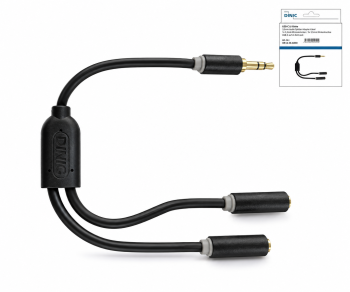
Two headphones on one output
A stereo splitter distributes the same left and right audio channels to two sockets. Available as a compact plug-in adapter or with a 20 cm cable in the DINIC Box or DINIC Blister.
The output must support the combined load of both headphones. These stereo splitters do not split the headset microphone signal.
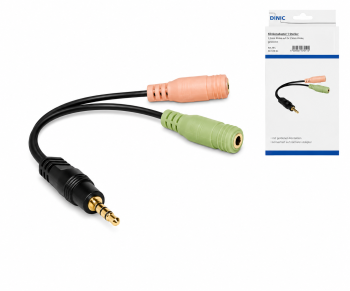
Headset: Assigning audio and microphone
Headset with a combined plug: 4-pin socket to two 3-pin plugs, available as a DINIC box or in a polybag.
Headset with two plugs: 4-pin plug to separate headphone and microphone sockets, available in a DINIC Box or polybag.
Both versions are 15 cm long. The pin configuration of the headset, adapter and device must match.
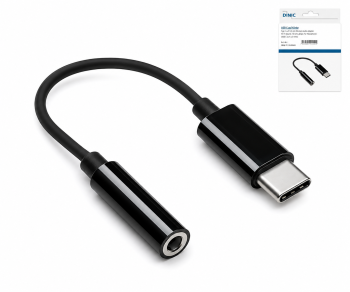
USB-C to 3.5 mm jack with DAC/ADC
The integrated chipset converts digital USB audio signals for analogue playback and supports a microphone input. The adapters are approx. 13.5 cm long and are powered via USB-C.
Available in black as a DINIC box or polybag, and in white as a DINIC box or polybag.
USB audio support on the end device is required. The microphone function also depends on the headset pin configuration and the host system.
What do TS, TRS and TRRS mean?
TS refers to two pins and is used in the mono RCA adaptor on offer. TRS has three pins: left, right and earth in the stereo adaptors. TRRS has four pins and, with compatible headsets, also carries the microphone signal. The device configuration remains the decisive factor: a three-pin connector, for example, may also be designed for balanced mono audio.
Can a Y-adapter combine two audio sources?
A passive stereo splitter is used to distribute an output signal. Two active audio outputs must not be connected directly to it. A suitable mixing circuit is required to combine different sources.
Complement with suitable connection cables
- Jack connection cables for connecting compatible audio sockets.
- Jack extension cables for additional reach; note the number of pins and microphone pass-through.
- RCA-to-jack cables for analogue stereo connections between the two connector systems.
Jack adaptors for specialist retailers, IT and service providers
Order DINIC audio adaptors from the MAG B2B shop. To select the right product, please specify the plug and socket type, number of pins, desired audio/microphone function, as well as the quantity and packaging.
Enquire about a suitable audio adapter
Further basic information can be found in the Cable Glossary for B2B.