
 German / Deutsch
  English
  French / Français
  Spanish / Español
  Dutch / Nederlands
  Italian / Italiano
  Polish / Polski
  Norwegian / Norsk
  Danish / Dansk
  Finnish / Suomi
  Swedish / Svenska
  Czech / Česky
  Greek / Ελληνικά
  Slovak / Slovenčina
  Slovenian / Slovenščina
  Estonian / Eesti
  Latvian / Latviešu
  Lithuanian / Lietuvių
  Hungarian / Magyar
  Romanian / Română
  Bulgarian / Български
  Portuguese / Português
 DVI adaptor for HDMI, VGA and DisplayPort
DINIC · Monitor adapters for business customers
DINIC DVI adapters connect different generations of ports in the workplace, in meeting rooms and in IT services. Here you will find HDMI/DVI adaptors, analogue DVI-I/VGA adaptors, and adaptors from DisplayPort and Mini DisplayPort to DVI. This allows suitable existing screens and projectors to continue being used with other device connections.
Go directly to selected connection solutions:
Important for DVI to VGA: A passive adapter requires an analogue signal at the DVI port. DVI-D is purely digital and is not suitable for this purpose. Also check the plug, socket and signal direction.
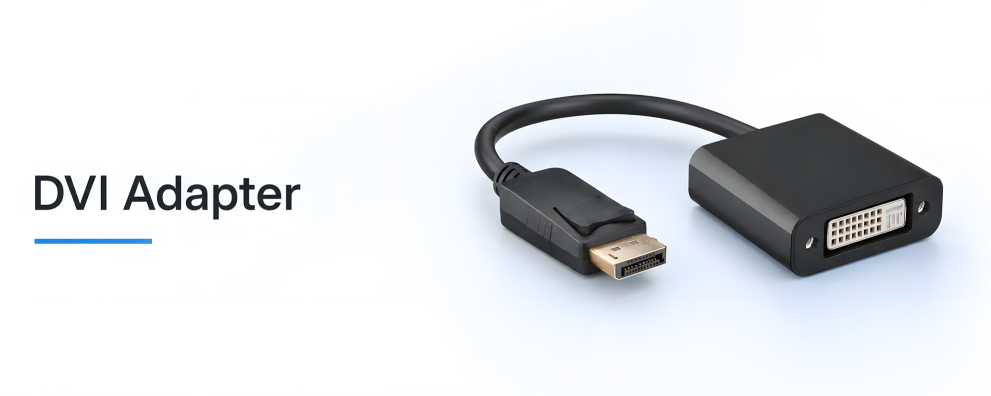
Connect existing monitors and projectors correctly

Which DVI adapter is suitable for your connection?
The key factors are the output on the computer, the input on the monitor and the connectors on the existing cable. A plug fits into a device or cable socket; an adapter socket accepts the matching cable plug. The overview will help you choose the right combination.
| Adapter / Product | Typical connection scenario | What to look out for? |
|---|---|---|
| DVI-D plug / HDMI socket HDMI-DVI-AFM-KB |
Connecting an HDMI cable to a device with a DVI socket. | Digital image transmission between HDMI and DVI. |
| HDMI plug / DVI socket HDMI-DVI-AMF-KB |
Connect a DVI cable to an HDMI socket. | The DVI socket does not provide an analogue VGA signal in this case. |
| DVI-I plug / VGA socket DVI-8750-KB |
Connect a VGA cable to the analogue DVI-I output. | Passive; only if analogue signal output is available. |
| VGA plug / DVI-I socket DVI-9100-KB |
Connect DVI-I cabling for analogue signals to a VGA socket. | No conversion between digital DVI-D and VGA. |
| DisplayPort plug / DVI socket DP-DVI-MFA-KB |
Connect a DisplayPort source to a DVI monitor. | Up to 1920 × 1200 at 60 Hz; digital DVI signal path. |
| Mini-DP plug / DVI socket MDP-DVI |
Connect a Mini DisplayPort source to a DVI monitor. | Up to 1920 × 1080; the source must support DP++. |
The notes and resolution specifications refer to the linked models. The source, adapter, connection cable and display must all support the desired signal mode.
DVI-D and DVI-I: The signal determines the mode
DVI-D: digital video signals
DVI-D carries digital video signals. Suitable HDMI/DVI adaptors enable connection to HDMI devices. A passive plug-in adaptor is not sufficient for an analogue VGA input.
DVI-I: designed for both digital and analogue
DVI-I also provides contacts for analogue signals. A passive DVI-I/VGA adapter utilises these pins. The connected device must actually support analogue output or input.
The shape of the socket alone is not enough: a DVI socket with additional contact pins may be wired exclusively for digital signals when used with an HDMI or DisplayPort adapter. The signal specifications of the product are decisive, not just the visible contacts.
Frequently asked questions about DVI adaptors
Can I use a DVI-D output with a passive VGA adapter?
No. DVI-D does not provide analogue VGA signals. Active conversion from digital to analogue is required for this signal conversion. The passive DVI-I/VGA adaptors linked here do not perform this conversion.
Do HDMI/DVI adapters work in both directions?
The passive HDMI/DVI plug-in adapters shown here can, in principle, connect compatible digital video signals in both directions. The key factors are matching plugs and sockets, as well as a resolution and refresh rate supported by both devices. This does not result in an analogue VGA connection.
Can a DisplayPort-to-DVI adapter also transmit DVI to DisplayPort?
No. The DP and Mini-DP adaptors offered here are designed for a DisplayPort source and a DVI display. For DVI as the source and DisplayPort as the monitor input, you will need an active solution specifically designed for this direction.
What resolution does a DVI adapter support?
This depends on the model and the connected devices. The DP-DVI-MFA-KB is specified up to 1920 × 1200 at 60 Hz, whilst the MDP-DVI is specified up to 1920 × 1080. Do not assume these values apply to other adapters. Always check the specific resolution and, where specified, the refresh rate.
Is audio also transmitted via HDMI to DVI?
For standard DVI monitors, you’ll need to provide a separate audio connection. The HDMI/DVI adapters are designed for digital video transmission. For speakers or an audio system, you’ll need a suitable audio output on the source device.
Add suitable cables and further adapters
For connecting the adapter to the monitor, you’ll find DVI cables, HDMI cables, as well as VGA cables and adapters. Further solutions for computers with a DP output are available in the DisplayPort adapters category. Ensure the connector pinout, signal type and cable length are compatible with your devices.
DVI adapters for specialist retailers, system integrators and businesses
MAG GmbH has specialised in cables and adapters since 1992. Through our DINIC brand, we support commercial procurement for IT services, workstation upgrades and resale. Different packaging options are available depending on the item; technical specifications and stock levels can be found on the product pages.
Unsure about DVI-D, DVI-I or the correct connector type? Send us the device models, a photo of the connectors if possible, the desired resolution and your required quantity. This allows us to specifically check for the correct connection.