
 German / Deutsch
  English
  French / Français
  Spanish / Español
  Dutch / Nederlands
  Italian / Italiano
  Polish / Polski
  Norwegian / Norsk
  Danish / Dansk
  Finnish / Suomi
  Swedish / Svenska
  Czech / Česky
  Greek / Ελληνικά
  Slovak / Slovenčina
  Slovenian / Slovenščina
  Estonian / Eesti
  Latvian / Latviešu
  Lithuanian / Lietuvių
  Hungarian / Magyar
  Romanian / Română
  Bulgarian / Български
  Portuguese / Português
 SCART cables and adaptors for TVs, DVD players and video recorders
DINIC SCART solutions for specialist retailers, service providers and media technology: Connect DVD players, video recorders and older set-top boxes to compatible TV and AV equipment. The range includes 21-pin SCART cables, switchable RCA adaptors and active converters for connecting a SCART source to an HDMI display.
Fully-terminated Type U cables in 1.5 m or 3 m lengths with gold-plated contacts.
SCART-to-HDMI converters for analogue picture and sound, with HDMI output up to 1080p at 60 Hz.
SCART-to-3x RCA cable, 2 m, for composite video and stereo audio with IN/OUT selector switch.
Before making your selection, check the connectors, signal formats and transmission direction. The HDMI converters operate from SCART to HDMI; the RCA versions have a direction switch.
SCART cables, RCA adaptors and SCART-to-HDMI converters
Connecting SCART to SCART
Connecting a SCART device to HDMI
Connecting SCART and RCA

Which SCART cable or adapter is suitable?
First, choose based on the output of the source device and the input of the target device. Two SCART sockets can be connected using a SCART cable. For RCA sockets, you’ll need a suitable analogue adapter; for an HDMI input, you’ll need an active signal converter.
| Connection | Suitable product | What matters |
|---|---|---|
| SCART output to SCART input | SCART cable 1.5 m or SCART cable 3 m | 21-pin, Type U, fully pin-assigned; check that both devices support the relevant signals. |
| SCART source to HDMI screen | Converter in DINIC box or converter in bulk box | Active conversion from SCART to HDMI; up to 1080p at 60 Hz; 5 V power supply included. |
| SCART and three RCA sockets | SCART-to-RCA cable, 2 m | SCART plug and three RCA plugs; composite video and stereo audio; IN/OUT switchable. |
| SCART with existing RCA or S-Video cables | SCART adapter with RCA and mini-DIN sockets | Three RCA sockets and one 4-pin S-Video socket; IN/OUT switch. |
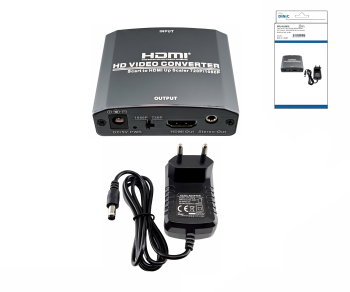
Connecting a video recorder or DVD player to a television without a SCART socket
If the television has an HDMI input, a SCART-to-HDMI converter connects the analogue source to the screen. Connect the source device to the converter via a SCART cable and connect the converter’s HDMI output to the television.
The models on offer support, amongst others, PAL, NTSC and SECAM, as well as HDMI output up to 1080p at 60 Hz. The 5 V power supply is included. The stated length of 1.10 m refers to the power supply cable; SCART and HDMI connection cables must be provided separately.
You can find suitable HDMI cables in the relevant category.
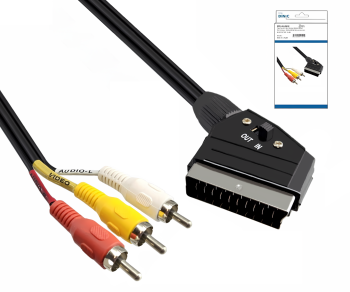
SCART to RCA: What do IN/OUT mean?
On the 2-metre SCART-to-RCA cable, yellow represents composite video, white represents the left audio channel and red represents the right audio channel.
- OUT: Output from the SCART device to the RCA inputs of the target device.
- IN: Input from a RCA source into the SCART input of the target device.
The switch determines the direction. The connected device must support the respective input or output function.
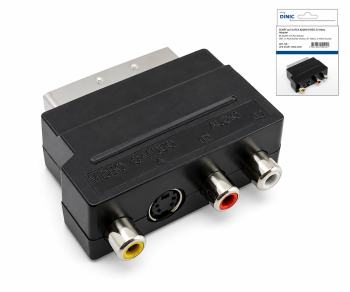
SCART adapter with RCA and S-Video
This compact SCART adapter is suitable for existing connection cables. It features three RCA sockets for composite video and stereo audio, as well as a 4-pin mini-DIN socket for S-Video.
For S-Video, the devices involved and the SCART connection used must support this signal mode. The passive adapter does not provide any missing signal conversion. S-Video transmits the picture; the sound is routed separately via the audio connections.
Choose a SCART cable in 1.5 m or 3 m
Both SCART-to-SCART cables are described as fully-populated, fully-shielded Type U versions. The 1.5 m cable has an outer diameter of approximately 7 mm and is supplied in a DINIC box. The 3 m version has gold-plated contacts and comes in a DINIC blister pack.
Ensure you allow sufficient length to avoid putting strain on the sockets. RCA audio cables are also available for separate analogue audio connections.
Frequently asked questions about SCART and HDMI
Does the SCART-to-HDMI converter also work from HDMI to SCART?
No. The converters on offer only convert from an analogue SCART input to a digital HDMI output. For the reverse direction, a dedicated HDMI-to-SCART converter is required.
Will this turn a VHS recording into true Full HD?
The specification ‘1080p’ describes the possible HDMI output resolution. The analogue source material is upscaled; this does not result in any additional image detail from a source originally recorded in Full HD.
SCART solutions for specialist retailers, repair shops and media technology
Please provide us with the source and destination devices, connectors, signal direction, cable length and quantity. MAG will assist you in selecting suitable DINIC cables and adaptors. The packaging overview explains the available packaging options.
Send a B2B enquiry to MAGYou can find further connection terms in the Cable Glossary for B2B.