
 German / Deutsch
  English
  French / Français
  Spanish / Español
  Dutch / Nederlands
  Italian / Italiano
  Polish / Polski
  Norwegian / Norsk
  Danish / Dansk
  Finnish / Suomi
  Swedish / Svenska
  Czech / Česky
  Greek / Ελληνικά
  Slovak / Slovenčina
  Slovenian / Slovenščina
  Estonian / Eesti
  Latvian / Latviešu
  Lithuanian / Lietuvių
  Hungarian / Magyar
  Romanian / Română
  Bulgarian / Български
  Portuguese / Português
 DSL cables & VDSL connection cables for routers in the MAG-Kabel B2B shop
DINIC DSL connection cables for specialist retailers, system integrators and installation companies: Connect the TAE-F connection socket to the appropriate DSL port on your router, or choose an RJ11-to-RJ45 modular cable for compatible DSL connections. The range includes TAE-F-to-RJ45 cables in lengths of 3, 6 and 10 metres, as well as RJ11/RJ45 versions in lengths of 3 and 6 metres. Choose according to connector type, pin configuration, length and packaging.
TAE-F to RJ45 DSL cable, 3 m, with two contacts assigned to RJ45 pins 4 and 5.
DSL modular cable, RJ11 to RJ45, 3 m, for compatible DSL sockets with the correct pin configuration.
10-metre TAE-F-to-RJ45 cable as a continuous connection cable between the TAE socket and the router.
DSL and VDSL cables for routers and modems
Connecting a router to a TAE-F socket
Connecting RJ11 to RJ45
Bridging a longer connection path

Which DSL cable is compatible with your router?
A DSL connection cable carries the DSL signal to the DSL input on your router or modem. First, check the connection socket and the corresponding device socket. An RJ45 connector alone does not necessarily indicate whether a connection provides DSL, Ethernet or another function.
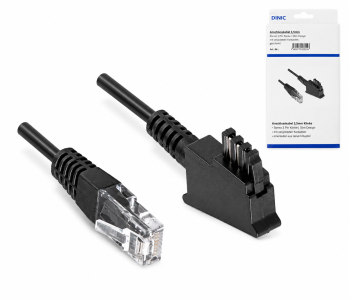
TAE-F to RJ45 for DSL and VDSL
The 3-metre DSL cable in the DINIC box connects a TAE-F connection socket to a compatible RJ45 DSL input.
The black twisted-pair cable is configured as 8P2C on the RJ45 plug, with pins 4 and 5 assigned. Other lengths available are 6 m and 10 m.
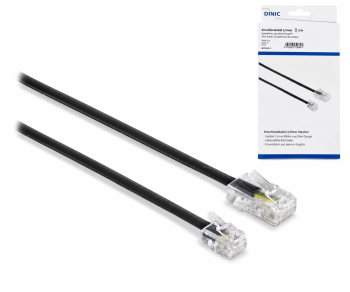
RJ11 to RJ45 as a DSL modular cable
These cables feature an RJ11 connector in 6P4C configuration and an RJ45 connector in 8P4C configuration, each with four pins.
For suitable DSL connections, for example between an existing splitter and a modem. Available in 3 m and 6 m lengths. The pin configuration must match both connectors.
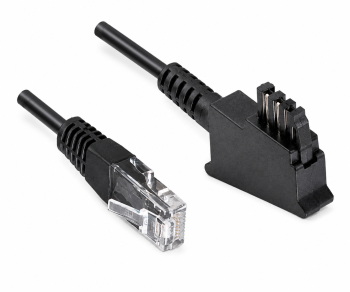
Select DSL cables by connector, length and packaging
| Connector | Lengths and variants | Pin configuration and packaging |
|---|---|---|
| TAE-F to RJ45 | 3 m, 6 m, 10 m | RJ45: 8P2C, pins 4 and 5; twisted pair, black, DINIC box. |
| TAE-F to RJ45 in a polybag | 3 m, 6 m | RJ45: 8P2C, pins 4 and 5; twisted pair, black, DINIC polybag. |
| RJ11 to RJ45 | 3 m, 6 m | RJ11: 6P4C; RJ45: 8P4C; black, DINIC box. |
What does 8P2C with pins 4 and 5 mean?
8P2C refers to eight contact positions with two populated contacts. In the case of the TAE-F-to-RJ45 DSL cables in this category, these are located on the central pins 4 and 5 of the RJ45 plug. This specification describes the DSL signal routing and does not mean that the cable is an eight-core network cable.
Which DSL cable do I need for a FRITZ!Box or Speedport?
The specific router model and its DSL connection are decisive. If the device documentation specifies a TAE-F-to-RJ45 cable with DSL pinout on pins 4 and 5, select the corresponding version from this category. Check your existing cable, the connector type and the pin configuration. The brand name alone is not sufficient to make a selection.
Is a DSL cable with an RJ45 connector also a LAN cable?
The DSL cables offered here are not Ethernet patch cables. The TAE-F versions carry the DSL signal via two contacts; the RJ11/RJ45 modular cables have a different pin configuration and pin assignment to LAN cables. To connect your router to a PC or switch, you’ll need a suitable Ethernet patch cable.
Can I use a 10-metre DSL cable?
The 10-metre TAE-F to RJ45 connection cable is designed for DSL/VDSL connections with the correct pinout. Measure the actual route and select the required length, allowing for a little extra cable. Avoid unnecessary connectors and sharp bends. The achievable data rate depends on the entire connection, the cable quality and the router.
When is the twisted-pair version useful?
In twisted-pair cables, the paired wires are twisted together. This design helps to reduce electromagnetic interference affecting signal transmission. The TAE-F to RJ45 cables in this category are twisted-pair cables.
Do I also need a DSL cable for fibre-optic connections?
For a direct optical connection, you will need a suitable fibre-optic cable for the router. If a separate fibre-optic modem or ONT is used, the connection to the router is often made via Ethernet. You should therefore choose based on the connection type and device configuration first.
Suitable accessories and other connection cables
For analogue telephones connected to the router’s telephone socket, you’ll find telephone cables with TAE and RJ11 connectors. Further connectors and sockets are available in the ‘Telephone Adapters and TAE Accessories’ category. The Cable Encyclopaedia, with its B2B guides, explains the basics.
DSL connection cables for your B2B needs
Please let us know your router model, connection socket, required connectors, cable length, packaging requirements and quantity. A photo of the existing connections will help us make the right selection.
Send a B2B enquiry to MAG