 German / Deutsch
  English
  French / Français
  Spanish / Español
  Dutch / Nederlands
  Italian / Italiano
  Polish / Polski
  Norwegian / Norsk
  Danish / Dansk
  Finnish / Suomi
  Swedish / Svenska
  Czech / Česky
  Greek / Ελληνικά
  Slovak / Slovenčina
  Slovenian / Slovenščina
  Estonian / Eesti
  Latvian / Latviešu
  Lithuanian / Lietuvių
  Hungarian / Magyar
  Romanian / Română
  Bulgarian / Български
  Portuguese / Português
 -
You do not have any products in your shopping cart yet.
Micro-HDMI & Mini-HDMI: Cables and connectors
DINIC · Compact HDMI connectors for AV and IT
A Micro-HDMI-to-HDMI cable allows you to connect compatible cameras, compact media players and embedded systems to an HDMI display device. This category focuses on DINIC cables featuring Micro-HDMI Type D and HDMI Type A: 2 m long, black and with gold-plated contacts – available in a polybag or in a DINIC box.
Mini-HDMI is a different connector type: Mini-HDMI uses Type C, whilst Micro-HDMI uses Type D. You should therefore check the device’s socket before ordering. If you require a Mini-HDMI connection, please send us your connection specifications.
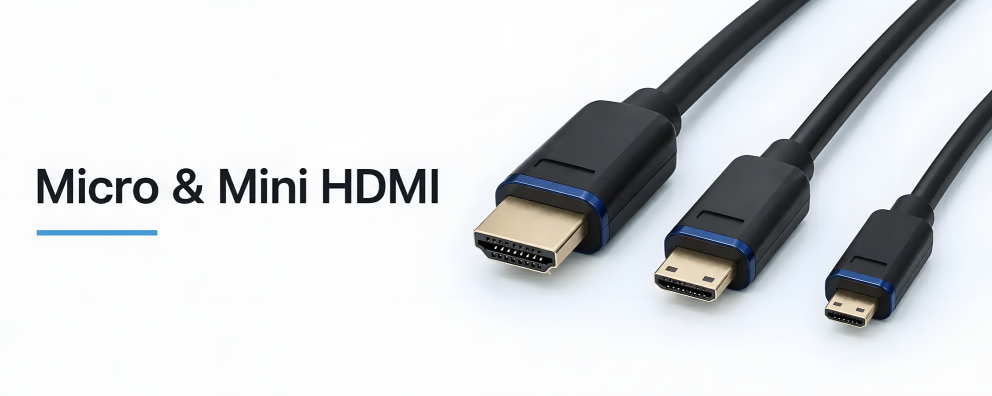
Connecting Micro-HDMI devices to a monitor, TV or projector

1 to 3 (from a total of 3)
What is the difference between HDMI, Mini-HDMI and Micro-HDMI?
These terms refer to different HDMI connector types. HDMI Type A is the standard size commonly used; Mini-HDMI Type C is smaller, and Micro-HDMI Type D is even more compact. The connector types are not mechanically interchangeable. When choosing, it is the actual socket on the device that matters, not just the device category.
| Designation | Design | What matters? |
|---|---|---|
| HDMI Type A | Standard size, 19-pin | Commonly found on monitors, TVs, projectors and media players. On the cables linked here, this is the larger connector. |
| Mini-HDMI Type C | Compact design, 19-pin | Only for a Mini-HDMI socket. A Micro-HDMI plug will not fit. |
| Micro-HDMI Type D | The smallest of these three designs, 19-pin | Compatible with the Micro-HDMI socket on the compact device. This is the small plug used on the cables recommended here. |
Micro-HDMI to HDMI: 2 m in a polybag or box
The following two versions feature an HDMI Type A plug and a Micro-HDMI Type D plug. Both are 2 m long, black and fitted with gold-plated contacts. Choose the packaging to suit your business needs or for resale.
DINIC polybag
The HDMI-AD-2-PB micro-HDMI cable in a DINIC polybag is suitable for stocking, service call-outs and use in projects. The packaging can be stored in a space-saving manner in the warehouse and in a service case.
DINIC box with Euro hole
The HDMI-AD-2KB micro-HDMI cable is supplied in a DINIC box with a Euro hole. This packaging is particularly suitable for display in specialist shops and for resale.
Connecting a camera or compact media player correctly
- Check the connectors: The source must have a suitable Micro-HDMI Type D output, and the display must have an HDMI Type A input. Cameras and compact devices may use different sockets depending on the model.
- Adjust the picture mode: Compare the desired resolution and refresh rate with the specifications for the source, cable and display. The connector shape alone does not indicate the supported data rate.
- Plan the cable route: Check whether 2 m, including a connection allowance, is sufficient. Route the cable without applying any tension or lateral pressure to the small device socket.
- Test the connection: Select the correct HDMI input on the display and, if necessary, enable HDMI output on the source. Test the intended setup before use.
Frequently asked questions about Micro-HDMI and Mini-HDMI
Is Mini-HDMI Type C the same as USB-C?
No. HDMI Type C refers to the Mini-HDMI connector type. USB-C is a different interface with a different socket. A Mini-HDMI cable cannot therefore be plugged directly into a USB-C port.
Can I connect a Micro-HDMI cable to a Micro-USB port?
No. Micro-HDMI Type D and Micro-USB are different connectors. Check the designation in the device manual or compare a photo of the socket with the product image.
Does every Micro-HDMI cable support 4K?
This cannot be determined from the shape of the connector. Check the resolution and refresh rate explicitly stated for the specific product. For the two 2-metre versions recommended here, no definitive maximum display mode is currently listed on the product pages. For a fixed specification such as 4K at 60 Hz, please enquire about suitability before placing your order.
Are picture and sound transmitted via Micro-HDMI?
HDMI can transmit digital picture and sound signals together. Which formats and functions are available depends on the source, the cable and the target device. The audio output must also be set correctly on both the source device and the display device.
Other HDMI connections
For devices with full-size HDMI Type A sockets at both ends, you will find suitable HDMI cables in the relevant category. HDMI adaptors, angled adaptors and connectors complement existing cabling. Ensure that each component is compatible with the connections and meets the required transmission specifications.
DINIC connection cables for specialist retailers and system integration
MAG GmbH has specialised in cables and adapters since 1992. With our own brand, DINIC, we support procurement for the retail, commercial and industrial sectors – from service and test stations to professional AV installations.
Do you need a Mini-HDMI connection or help selecting the right cable? Please send us the device model or a photo of the connectors, the connectors on both devices, the cable length, the resolution including refresh rate, and the quantity required. This will enable us to assess your requirements in detail.