MAG GUIDE · EQUIPMENT MANUFACTURING · IT · MEDIA TECHNOLOGY
Behind servers, monitors and technical equipment, every centimetre counts. An angled connector can make cable routing easier – provided the angle, the equipment’s input port and the available space are all compatible. The rear views below will help you determine the correct design for your project.
Which angle direction do I need?
Look at the rear of the device in its intended installation position and decide where the cable should run. Then compare the connector type and cable exit with the product image. ‘90°’ describes only the angle; the desired direction is determined by the design, installation position and viewing direction.
In the connection shown here, the device has a C14 device socket with three contact pins. This is compatible with a C13 device plug on the cable. The C13 plug is often referred to as an ‘IEC plug’ in everyday use.
Clicking on a diagram opens it in its original size in a new tab.
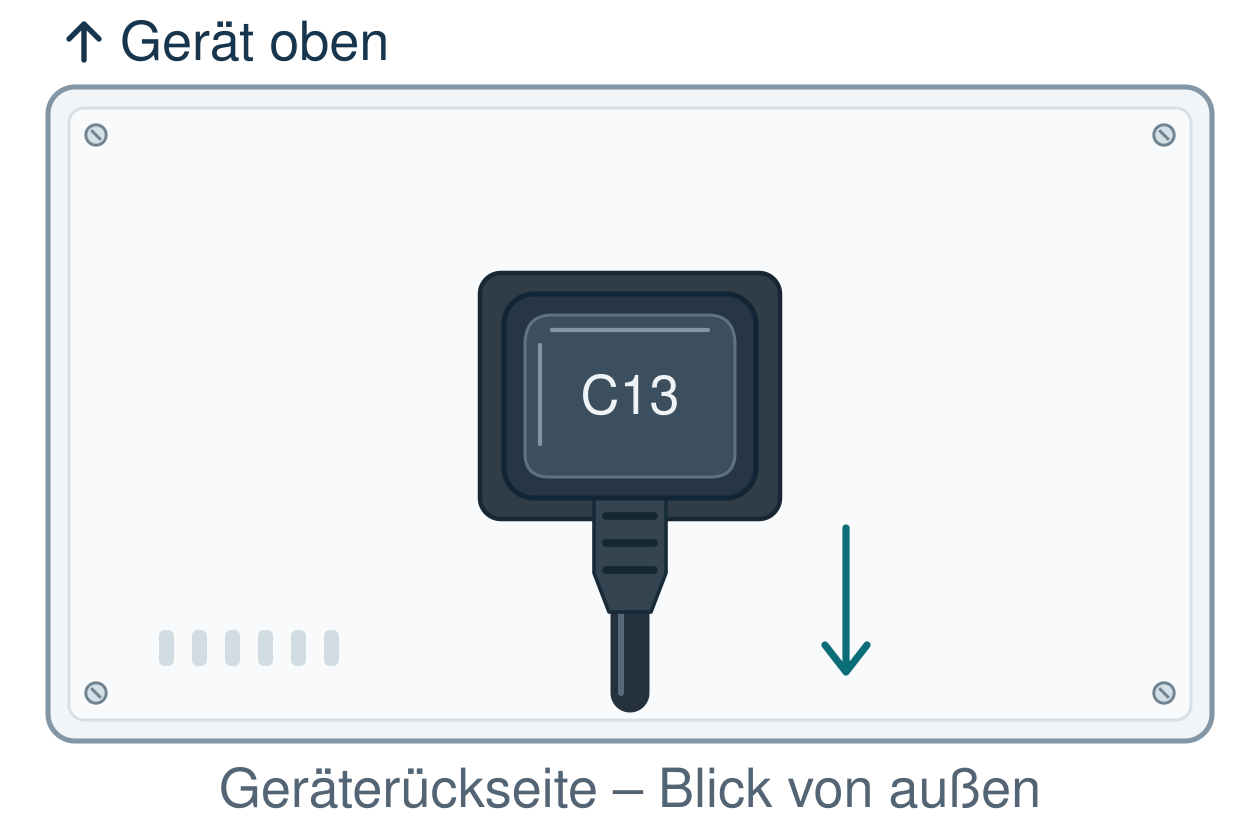
You are standing behind the appliance and looking at its connection side from the outside. Left and right refer to your view of this rear panel.
In all five diagrams, the device inlet remains aligned in the same way: PE at the top. This is the chosen reference orientation. On your device, the connection may be rotated or installed at an angle. This also changes the direction in which a particular angled cable runs once it is installed.
If your device has a different connection type, refer to the selection guide for C13, C15 and C19.
The four views each show a plugged-in C13 angled connector. Its housing covers the contacts of the C14 device inlet. The arrows indicate the cable outlet with the device orientation unchanged.
The sketches show four different angle variations. A plugged-in C13 coupler cannot be rotated freely. The illustrations are schematic, not to scale, and do not represent specific products.
First, use the sketches to determine the desired cable routing on the device. Then compare this with the plug face and cable outlet of the specific product. The direction shown in the sketch does not automatically correspond to a product code.
Product images may show the contact side or the rear side of a coupler. These views are opposite to one another. The contact sides of the C13 connector and the C14 appliance inlet face each other when plugged in. You should therefore compare the bevelled edges and the position of the earth contact. If the view is unclear, a drawing showing the viewing direction or checking against a sample will help.
The following C13/C14 extension leads show four available versions. ‘Left’, ‘right’, ‘top’ and ‘bottom’ refer to the respective product pages. To make your selection, open the relevant product page and refer to the illustrations shown there. Please take into account the viewing direction of the product photo and the installation orientation of your appliance inlet.
There is no universal minimum depth. Plug housings, kink protection, equipment inlets and cable configurations vary. An angled connector can reduce the space required at the rear, but in return requires space in the direction of the cable outlet.
Do not derive dimensions from the image size shown in the shop. Use an existing dimensional drawing or check the required installation space using a sample.
Mechanically compatible and electrically suitable
The angle and plug shape alone are not sufficient for approving a connection cable. In addition, the rated current, rated voltage, protective conductor, conductor cross-section, cable type, temperature requirements and necessary approvals must be suitable for the application. An adapter does not increase the permissible load capacity of the connection. The MAG power cable finder will assist you with the preliminary selection.
Select a question to view the answer.
No. 90° refers to the angle between the direction of the plug and the cable outlet. Whether the outlet points to the side, upwards or downwards depends on the design and the installation position.
A view from the connector side is not the same as a view from the cable side. Furthermore, the connection on the appliance may be oriented differently. We therefore recommend selecting our cables based on the relevant product image and checking that the connection type matches the installation orientation on your own appliance. If the view is unclear, a further detailed image, a diagram or our advice can help.
The shape of the C13/C14 connection determines the insertion orientation. Therefore, simply rotating the same connector will not result in a different outlet direction. Please select the version that suits your installation situation.
There is no one-size-fits-all answer. With an adapter, its housing and the existing connector plugged into it must be considered together. Compare the complete connection with the appropriate angled connection cable.
The approach based on the mating face, installation position and installation space is applicable. However, C19/C20 has a different design. For these, you must specifically select suitable cables or adapters and check their individual technical specifications.
If a standard product does not meet the requirements, project-specific custom-made solutions can be considered. Technical feasibility, design, quantity and any required certification will be agreed upon for the specific project.
To make a specific enquiry to MAG, please provide a photograph of the device’s connection side, with the desired cable orientation marked, and the available dimensions. Please also include the mains and device connections, electrical requirements, cable length, quantity and desired delivery date.
For recurring requirements, the selected item number and a documented installation layout make it easier to place a clear repeat order.
DINIC is MAG GmbH’s own brand for cables, adaptors and accessories. Further technical selection guides can be found in the MAG Cable Encyclopaedia.
Choosing the right angled power cables: left, right, top or bottom?
Which connector is fitted to the appliance?
Rear of the appliance without a connected cable
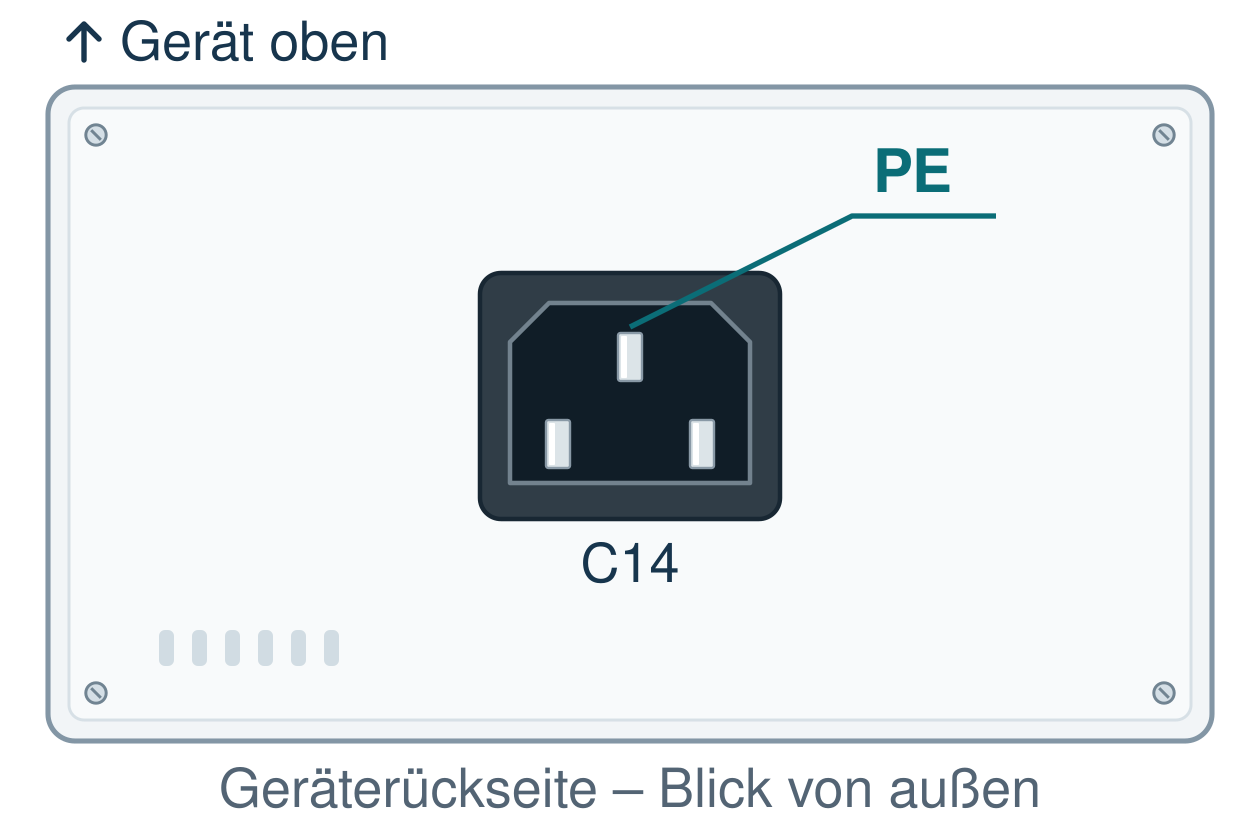
This viewing angle applies to all diagrams
Where should the cable lead behind the device?
Cable exit to the left
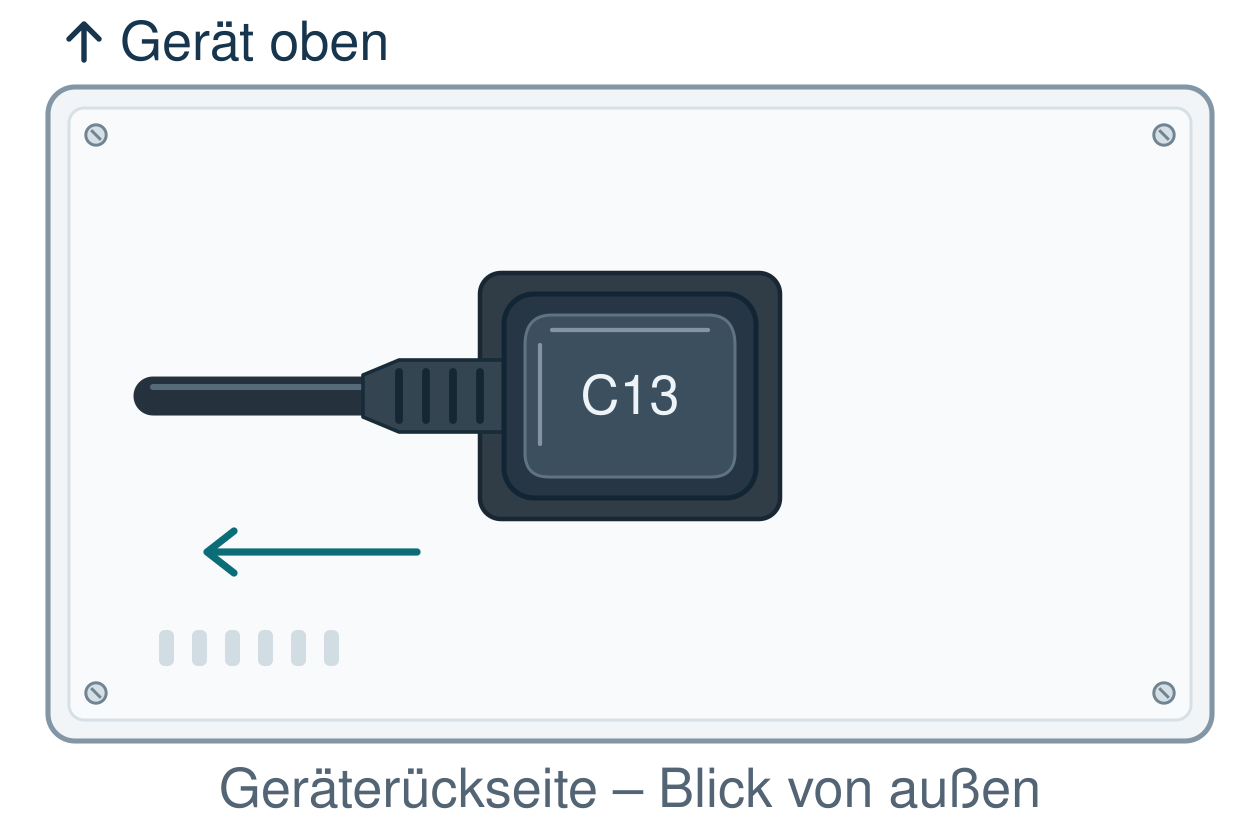
Cable exit to the right
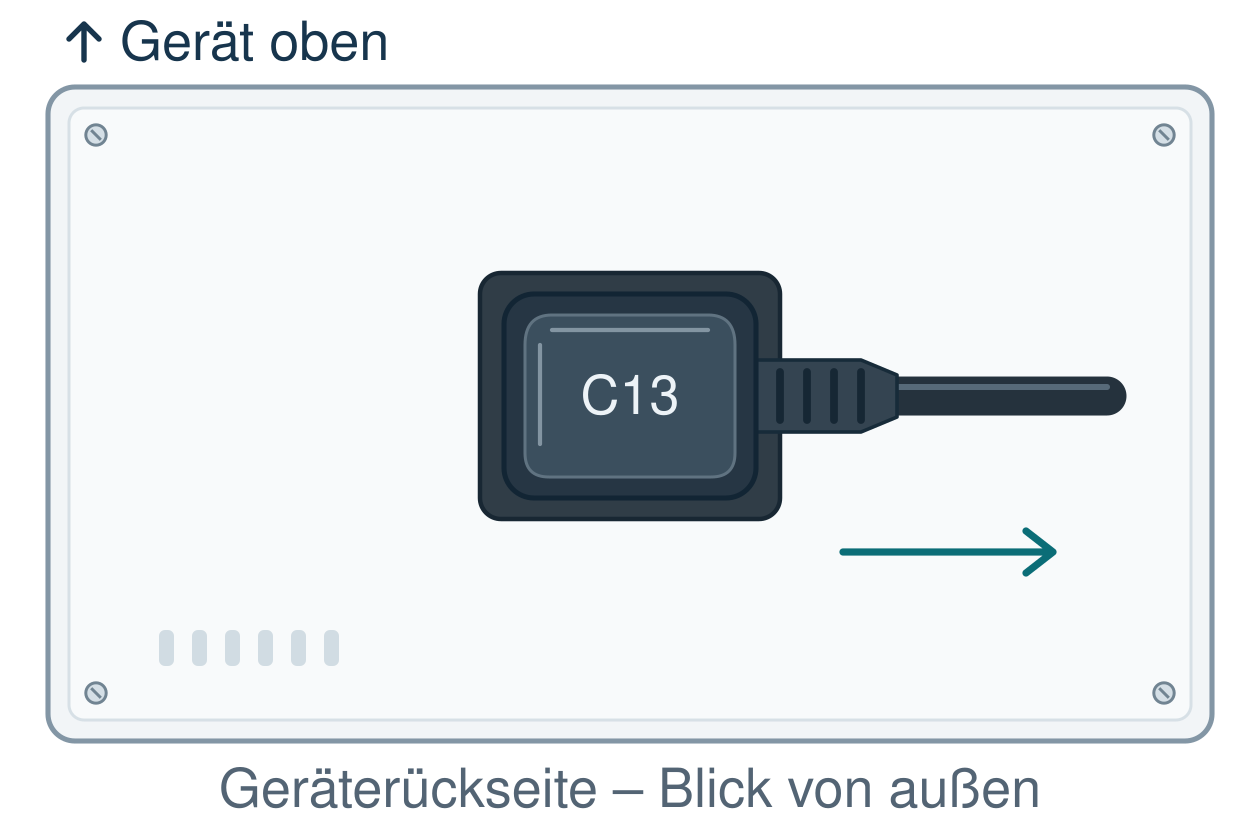
Cable exit upwards
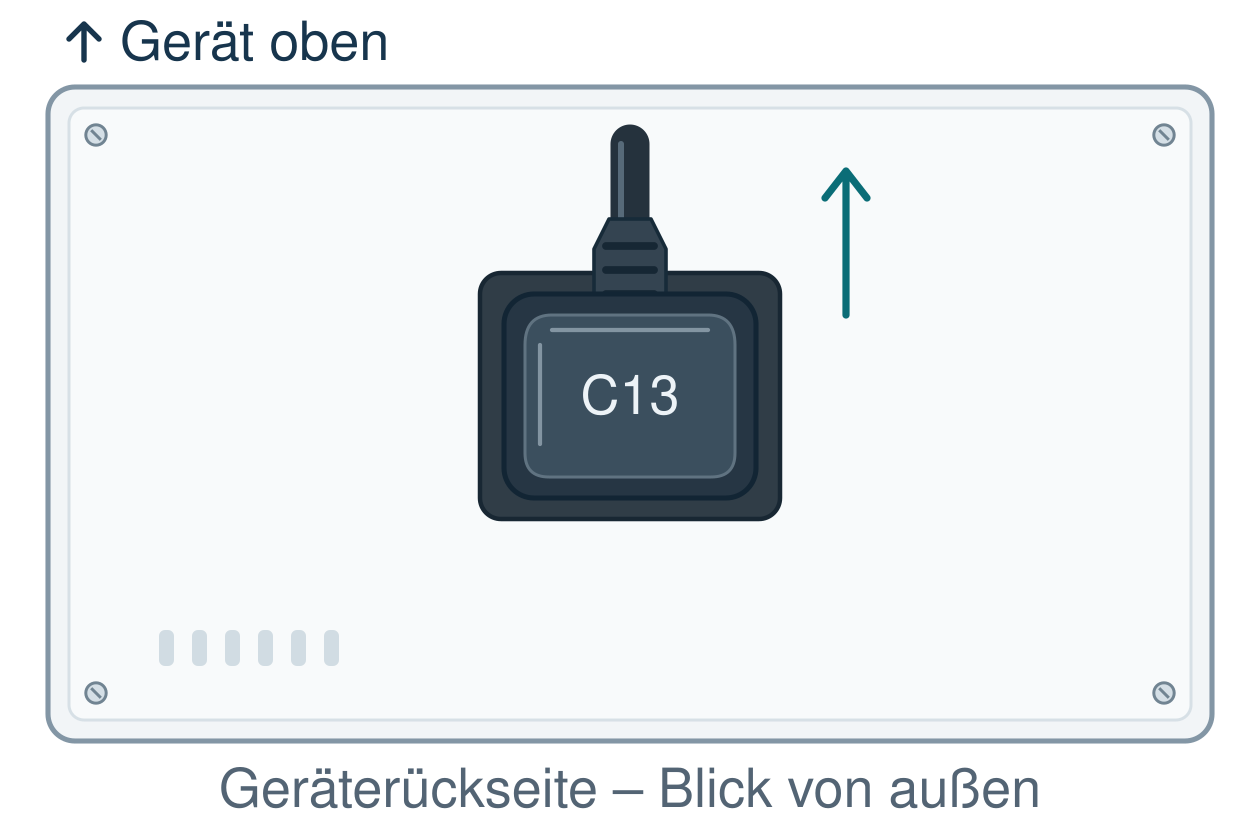
Cable exit downwards
How do I apply the sketch to product selection?
DINIC angle variants for comparison
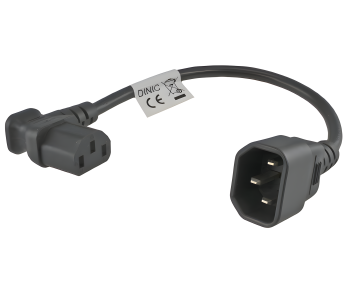
to the left
DINIC CB-K-D4-03
View product and detailed images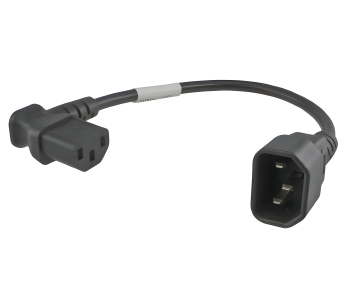
to the right
DINIC CB-K-D3-03
View product and detail images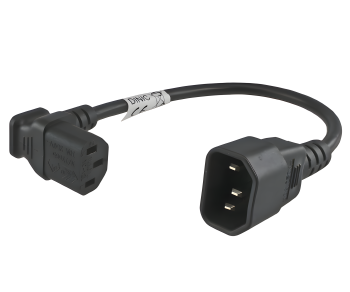
upwards
DINIC CB-K-D-03
View product and detail images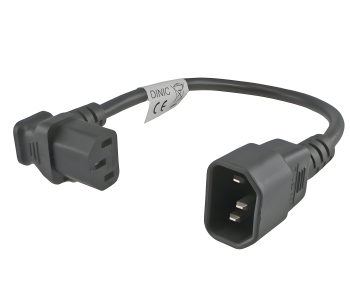
downwards
DINIC CB-K-D2-03
View product and detail imagesFour details required for a clear order
Angled cable, peripheral extension cable or angled adapter?
Your connection requirements
Suitable product type
What matters
From the mains socket to the appliance
CEE 7/7 to C13 mains cable with a suitable angled version
Check the mains and device sides separately. An angled earth-connected plug does not automatically mean that the C13 socket is also angled.
From a C13 outlet on a PDU or UPS to the device
C13/C14 extension lead for IT equipment
C14 plug on the supply side and C13 socket on the C14 device input. Check both connection points and the current-carrying capacity.
Reroute an existing suitable cable at the connection point
IEC angled adapter
The combination of the adapter and the existing socket may require additional installation space. Take into account the current-carrying capacity, fit and mechanical stress on the connection.
Secure the connection further against accidental disconnection
Suitable IEC-LOCK solution or slip-on sleeve
Check compatibility and space required for unlocking. An angled connector alone does not provide a locking mechanism.
How much space does an angled C13 connector require?
Frequently asked questions about angled power cables
Is a 90° plug always angled downwards?
Why can directional information be interpreted in different ways?
Can I simply plug a C13 connector in the opposite way round?
Does an angled adapter save just as much space as an angled cable?
Does the selection guide also apply to C19/C20?
Are other lengths or connector combinations possible?
Clarify the correct angle orientation for your project

B2B shop Retail, Trade & Industry
 German / Deutsch
  English
  French / Français
  Spanish / Español
  Dutch / Nederlands
  Italian / Italiano
  Polish / Polski
  Norwegian / Norsk
  Danish / Dansk
  Finnish / Suomi
  Swedish / Svenska
  Czech / Česky
  Greek / Ελληνικά
  Slovak / Slovenčina
  Slovenian / Slovenščina
  Estonian / Eesti
  Latvian / Latviešu
  Lithuanian / Lietuvių
  Hungarian / Magyar
  Romanian / Română
  Bulgarian / Български
  Portuguese / Português