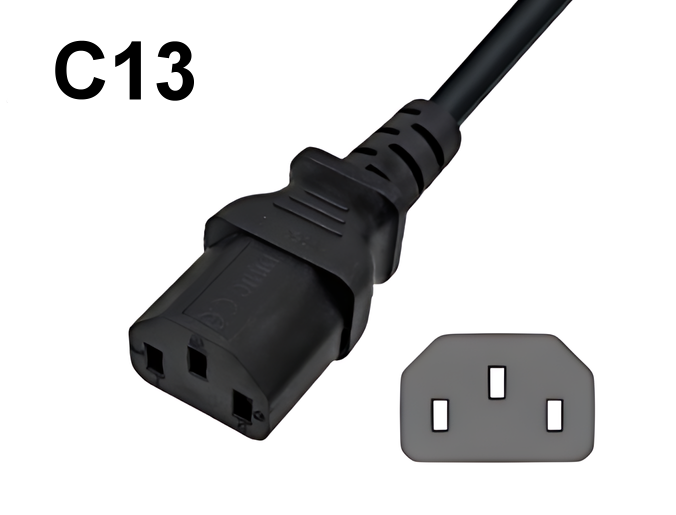
 C13 on the cable ↔ C14 on the device
C13 for many standard devices
Commonly used for PCs, monitors, printers, network and AV equipment, as well as other devices with a C14 socket.

 German / Deutsch
  English
  French / Français
  Spanish / Español
  Dutch / Nederlands
  Italian / Italiano
  Polish / Polski
  Norwegian / Norsk
  Danish / Dansk
  Finnish / Suomi
  Swedish / Svenska
  Czech / Česky
  Greek / Ελληνικά
  Slovak / Slovenčina
  Slovenian / Slovenščina
  Estonian / Eesti
  Latvian / Latviešu
  Lithuanian / Lietuvių
  Hungarian / Magyar
  Romanian / Română
  Bulgarian / Български
  Portuguese / Português
IEC 60320 Selection Guide for B2B
C13, C15 and C19 refer to the cable-side IEC appliance couplers. The corresponding appliance sockets are C14, C16 and C20. The correct selection depends on the actual appliance socket, the permissible pin temperature, the electrical specifications of the complete connection cable, the mains plug and the requirements in the country of use.
This overview assists purchasing, IT, equipment manufacturing, retail and technical procurement with the initial selection. The device specifications, as well as the labelling, data sheet and approvals for the specific power cable, always take precedence.
Commonly used for PCs, monitors, printers, network and AV equipment, as well as other devices with a C14 socket.
For devices with a C16 input and applications where a connector is required to withstand higher permissible pin temperatures.
Larger IEC version for appropriately designed servers, PDUs, UPSs and technical equipment with a C20 device input.
The values in the table are intended to help classify these within the IEC 60320 family. They do not constitute a blanket approval for every cable, device or country.
What do 70 or 120 °C mean? This refers to the permissible temperature at the pin base of the device input within the respective IEC class. It does not refer to room temperature, nor does it automatically refer to the permissible temperature of the cable sheath.
The following applies to electrical load capacity: only the lowest value of the entire connection cable is permissible. Factors that are decisive include, amongst others, the mains plug, cable, conductor cross-section, cable length, IEC connector, device input, product marking, approvals and country of use.
C13, C15 and C19 are usually located on the cable. The corresponding inputs C14, C16 and C20 are located on the device.
In the IEC classification, C13 and C15 typically belong to the same 10 A class. C15 differs primarily in its higher permissible pin temperature.
C19 has a different, larger profile and is designed for a C20 input. The device socket is the deciding factor – not just the desired power reserve.
C13/C15 compatibility: Thanks to standardised coding, a C15 plug can also be used on a C14 socket. Conversely, a C13 coupler will not fit into a C16 socket. The device specifications and the labelling of the specific cable must still be checked.
A photo helps with orientation. To make a reliable choice, the device’s labelling and technical specifications should also be checked.
Clearly identify whether the device has a C14, C16 or C20 socket.
Determine the mains plug, destination country and available socket.
Take note of the current, voltage and the manufacturer’s specifications.
Select the length, cross-section, colour and whether to use a straight or angled cable.
Check that the specific product’s test marks and certificates are valid for the country of use.
The following links take you directly to the relevant B2B product groups. The category links use the active shop language.
Earthing plug power cables to IEC C13 for devices with a C14 input – available in various lengths, cross-sections, colours and designs.
Earthing plug power cables to IEC C15 for C16 inlets and suitable applications with a higher permissible pin temperature.
Earthing plug power cables to IEC C19 for appliances with C20 sockets and suitably rated professional applications.
B2B · mag-kabel.de
For commercial orders, ongoing requirements, resale, bulk quantities, international variants and technical project enquiries.
B2C · DINIC Shop
For one-off purchases and smaller quantities, private customers can find suitable DINIC power cables in the MAG GmbH retail shop.
C13 typically belongs to the C14 standard connectors, C15 to the more heat-resistant C16 connectors and C19 to the larger C20 design with a higher IEC current rating. The decisive factor is the socket on the appliance.
Yes, the standardised profile allows a C15 plug to be used on a C14 socket. Conversely, a C13 plug will not fit into a C16 socket due to the coding. The cable’s technical specifications and the device’s requirements remain decisive.
Not on the basis of the IEC class: C13 and C15 are typically classified as 10 A in this context. The key difference is the higher permissible pin temperature of the C15/C16 combination.
When the device has a C20 input and the electrical specifications of the complete connection cable are suitable for the application. The designation ‘server’, ‘PDU’ or ‘UPS’ alone is not sufficient as a selection criterion.
The temperature specification refers to the pin base of the device input within the IEC class. It does not describe the general room temperature, nor does it automatically indicate the permissible sheath temperature of the cable.
Where possible, the following details are required: device model, C14/C16/C20 input, mains plug and destination country, cable length, cross-section, power requirement, colour, straight or angled design, approvals and planned quantity.
B2B project enquiry
Do you require C13, C15 or C19 mains cables for a roll-out, recurring requirements, various target markets or a customised design? Please send us the key details. We will check suitable items in stock and – if necessary – arrange for a project-specific custom manufacture.
You can attach photos of the appliance inlet, data sheets or existing MAG part numbers directly to the email.
info@mag-kabel.de
The pre-prepared email already requests the most important project details in a structured format. You can complete the details in your preferred language.
Clicking this will open the email programme set up on your device. You must then send the email yourself.
Technical note: This selection guide does not replace checking the equipment documentation and the technical specifications of the specific connection cable. If in doubt, the equipment input, type plate and data sheet should all be checked against one another.
IEC C13, C15 or C19: Which power cable is suitable for the appliance?
C13, C15 and C19 at a glance
C13 on the cable ↔ C14 on the device
C13 for many standard devices
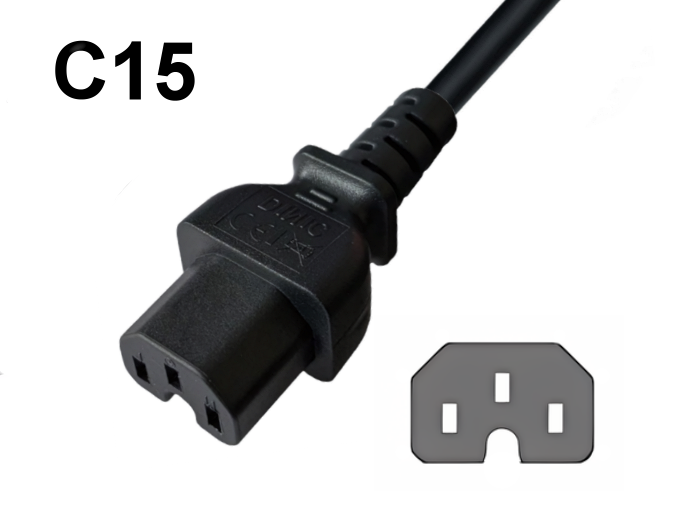 C15 on the cable ↔ C16 on the device
C15 for higher thermal requirements
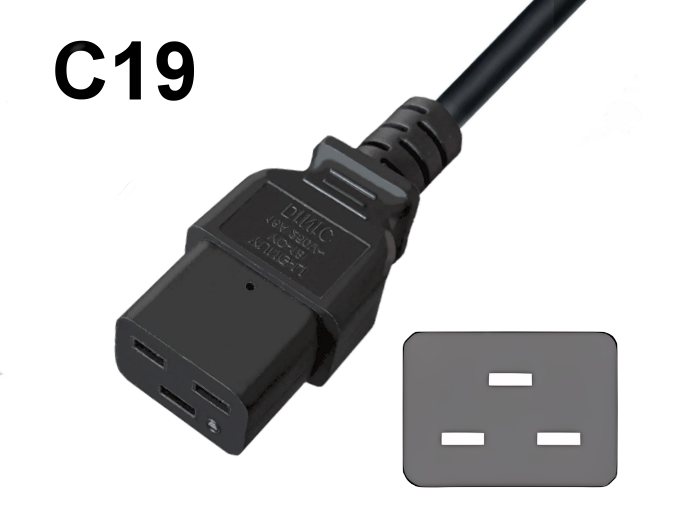 C19 on the cable ↔ C20 on the device
C19 for devices with a C20 input
IEC C13, C15 and C19: a direct comparison
Connector on the cable
Input on the device
Typical IEC classification
Max. pin temperature
Common applications
Selection rule
C13
C14
typically 10 A / 250 V AC
70 °C
PC, monitor, printer, network and AV equipment
If the device has a C14 input and the product specifications are suitable for the application.
C15
C16; can also be used on C14
typically 10 A / 250 V AC
120 °C
Devices with a C16 input or higher temperature requirements
Where a C16 or, where specified, a more temperature-resistant IEC connector is required.
C19
C20
typically 16 A / 250 V AC
70 °C
Servers, PDUs, UPSs and industrial equipment with a C20 input
Provided a C20 input is available and the entire connection cable is suitably rated.
Avoiding incorrect orders for IEC mains cables
Distinguish between the cable side and the appliance side
C15 does not automatically carry a higher current
C19 is not a general upgrade
Selecting a power cable in five steps
Clearly identify the device’s
Mains side
Electrical data
Cable
Approvals
Select suitable C13, C15 and C19 mains cables
C13 power cables
C15 power cables
C19 power cables
The right ordering process for businesses and private customers
For businesses, retailers and project work
For private customers and individual purchases
Frequently asked questions about IEC C13, C15 and C19
What is the main difference between C13, C15 and C19?
Will a C15 plug also fit into a C14 socket?
Is C15 rated for a higher current than C13?
When is a C19 power cable required?
What do 70 and 120 °C mean for IEC connectors?
What information is helpful for a B2B product recommendation?
Enquire about IEC power cables for a project, series production or export
Information required for a quick preliminary check
Direct project contact