
 German / Deutsch
  English
  French / Français
  Spanish / Español
  Dutch / Nederlands
  Italian / Italiano
  Polish / Polski
  Norwegian / Norsk
  Danish / Dansk
  Finnish / Suomi
  Swedish / Svenska
  Czech / Česky
  Greek / Ελληνικά
  Slovak / Slovenčina
  Slovenian / Slovenščina
  Estonian / Eesti
  Latvian / Latviešu
  Lithuanian / Lietuvių
  Hungarian / Magyar
  Romanian / Română
  Bulgarian / Български
  Portuguese / Português
 MAG GUIDE · POWER SUPPLY IN THE RACK
Connecting UPS, PDU and server: the right power cable
For a server with a C14 power socket connected to a C13 output on the UPS or PDU, you will need an IT extension lead with a C14 plug and a C13 socket. If the PDU has a fixed lead with a C14 plug, this is plugged directly into the C13 output of the UPS. A separate cable between the UPS and the PDU is then not required, provided the existing lead is long enough.
For a C19 output and a C20 equipment input, a C20 plug fits a C19 socket. However, to connect a C19 output to a C14 equipment input, you will need a C20 plug with a C13 socket.
Both connectors and the electrical load capacity are crucial. The terms ‘UPS cable’, ‘PDU cable’ or ‘server power cable’ alone do not determine a suitable plug combination.
Quick guide: Which cable fits between the devices?
First check the output of the power source and then the input or the fixed power supply cable of the device being powered. This applies to the connection from the UPS to the PDU as well as from the PDU to the server.
| Output of the UPS / PDU | Input or power lead on the device | Connection / required cable |
|---|---|---|
| C13 socket | Fixed PDU supply cable with C14 plug | Connect directly. If the cable is long enough, no additional UPS-PDU cable is required. |
| C13 socket | C14 equipment inlet | C14 plug to C13 coupler |
| C19 socket | C20 appliance socket | C20 plug to C19 coupler |
| C19 socket | C14 appliance socket | C20 plug to C13 coupler The C13 side limits the current rating. |
| Earthing socket | C14 appliance inlet | CEE 7/7 plug to C13 socket |
| Earthing socket | C20 appliance socket | CEE 7/7 plug to C19 socket |
The table describes the connection combinations. The rated current, voltage, cable, fuse rating and manufacturer’s approvals must also be compatible. On narrow screens, the table can be scrolled sideways.
PDU with a permanently connected supply cable? Its plug determines the correct UPS output: C14 fits into C13, C20 fits into C19. If the installation requires a longer reach, check for a suitable extension lead based on the total load and the manufacturer’s specifications.
How to choose the cables for your connection chain
An UPS (uninterruptible power supply) continues to supply power to connected devices for a limited time in the event of a mains power failure. A PDU (Power Distribution Unit) distributes the supplied electrical power to several loads within the rack. The server is connected via the input of its power supply unit. Each connection in this chain is selected individually.
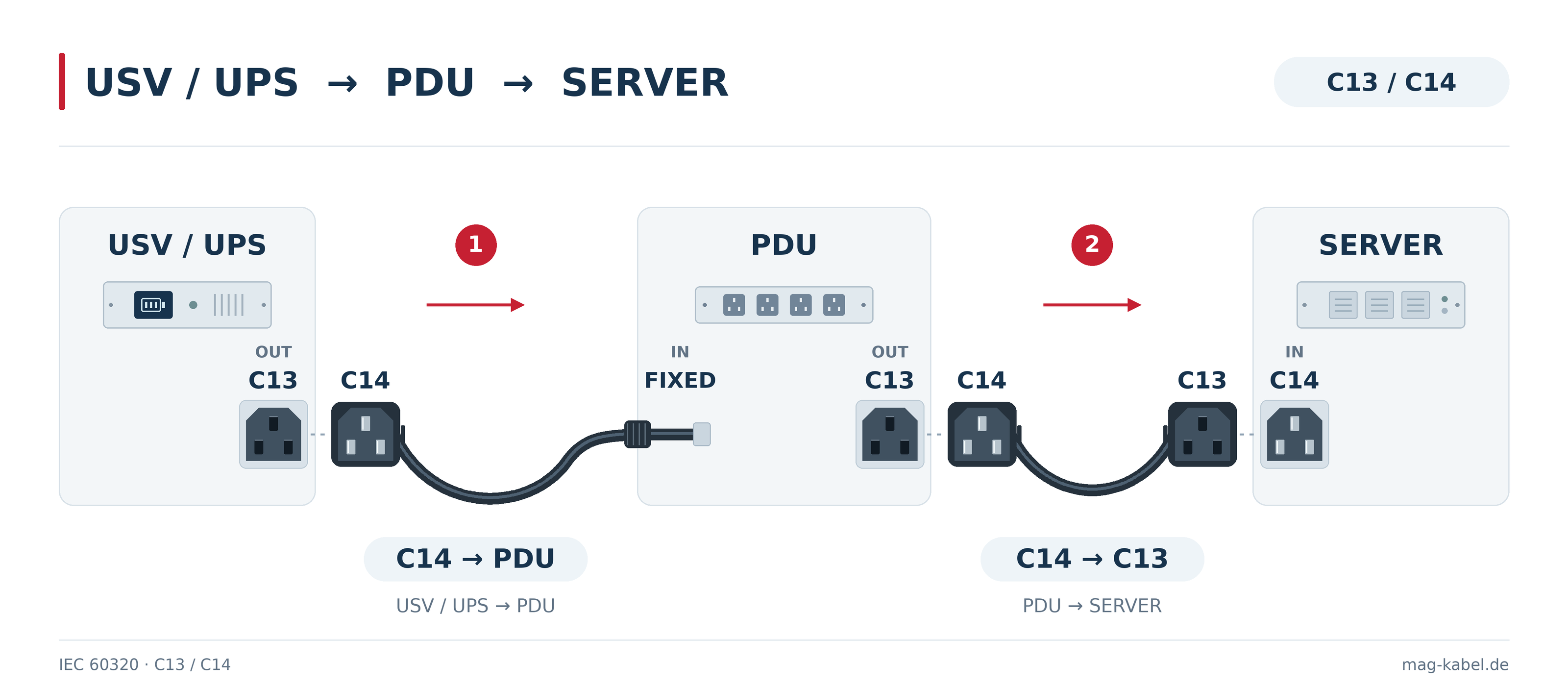
Example 1: PDU with fixed C14 power lead – as shown in the diagram
- UPS to PDU: The C14 plug of the permanently connected PDU feed line is plugged directly into a designated, battery-backed C13 output on the UPS.
- PDU to server: A separate C14–C13 cable connects a C13 output on the PDU to the C14 device input on the server. The C14 plug is fitted to the PDU, whilst the C13 socket is fitted to the server.
For each additional server connection with a C14 input, you will need another suitable C14–C13 cable. When doing so, check the combined load of all connected devices.
Example 2: PDU with detachable power lead
If the PDU has a C14 device input and the UPS has a C13 output, you will also need a C14-to-C13 cable between the UPS and the PDU. If the PDU has a C20 input and the UPS has a C19 output, select a C20 plug to C19 socket cable. The cables to the servers depend on the PDU output and the server input respectively.
The PDU supply cable carries the combined load of all connected devices. You should therefore check not only the individual server cables but also the total current of the PDU and the permissible load of the corresponding UPS output or output group.
Example 3: Connecting a server directly to the UPS
A single server with a C14 input can be connected directly to a suitable C13 output on the UPS using a C14-to-C13 cable. A PDU is not strictly necessary for this single connection.
Example 4: C19 output and server with C14 input
In this case, a C20 plug to C13 socket is the correct combination. The C20 plug utilises the C19 output of the power distribution unit; the C13 coupler supplies the device’s C14 input. The permissible load capacity of the C13 side and of the entire cable remains the decisive factor.
Operating devices with earthed plugs on a UPS
For this purpose, there is, for example, the DINIC 19-inch UPS power strip STT19-8USV with a permanently attached C14 lead, eight earthed sockets and 10 A overload protection. This version features earthed sockets instead of the C13 outlets shown in the diagram. For a server with a C14 input, use a suitable power cable with a CEE 7/7 plug and a C13 coupler. The total load must remain within the permissible limits of the power strip and the upstream UPS output.
Correctly assigning C13, C14, C19 and C20
C14 and C20 are the plugs with contact pins. On the connected device, the corresponding connections are called device inlets. C13 and C19 are the corresponding couplers with contact sockets; on the UPS and PDU, the corresponding outputs are often referred to as sockets.
A C13 output therefore accommodates the C14 plug of the cable. At the other end, the C13 coupler connects to the C14 input on the server. The shop description ‘C13 to C14’ and the description ‘C14 plug to C13 coupler’ refer to the same cable combination.
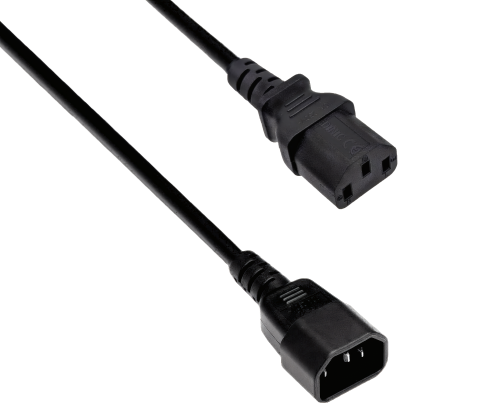
For C13 output and C14 device input.
Select C13/C14 cable →
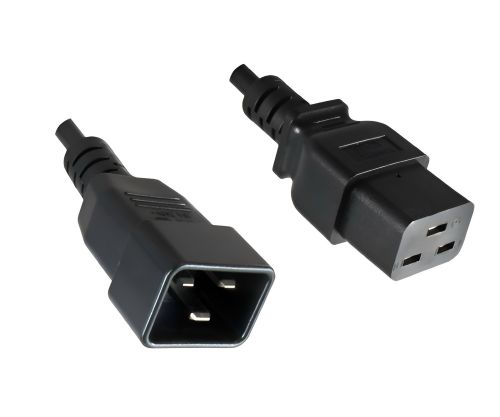
For C19 output and C20 equipment input.
Select C19/C20 cable →
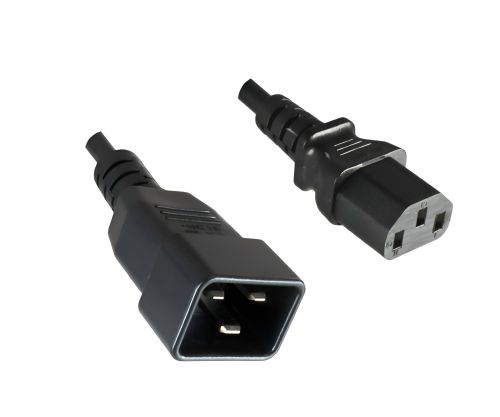
For C19 output and C14 device input.
Select C13/C20 cable →
Product images show examples of DINIC designs. Please refer to the relevant product listing for length, cross-section and rated values.
10 A or 16 A: What limits the connection?
In the IEC versions considered here, C13/C14 belong to the 10 A class and C19/C20 to the 16 A class, in each case up to 250 V AC. This is not a blanket approval for every cable or every installation. Different national approvals and the rated values of the specific components must be taken into account separately.
The lowest permissible current-carrying capacity of the connection is decisive. This includes the socket, socket group, connector, cable and appliance input. A C20 plug does not override the limitation of a C13 socket. Nor does a larger conductor cross-section turn a C13/C14 connection into a 16 A plug connection.
- Current and voltage: Compare the rated values on the device, the UPS/PDU and in the cable data sheet.
- Total load: The number of sockets does not increase either the UPS power rating or the load capacity of the shared supply cable.
- UPS power: Take into account both the permissible active power in watts and the apparent power in VA. Factor in inrush currents and the manufacturer’s specifications.
- Cross-section and length: Select according to current requirements, cable type and operating conditions. The cross-section alone does not determine the permissible current of the finished cable.
Selecting the correct conductor cross-sections for mains cables →
No suitable output for a C20 equipment input? An adapter to a lower-rated socket does not provide any additional power. Have the connection, fuse protection and load checked against the equipment specifications. This guide assists with product selection; the electrical design of the system must be carried out professionally.
Cable length, angles, colour and fuse in the rack
- Length: Measure the actual route and allow sufficient slack for tension-free routing and maintenance. Large cable loops can obstruct air flow and service access.
- Angled connectors: A 90° version may be useful where installation depth is limited. Check the direction of the cable outlet using the product image and installation position.
- Colour coding: Coloured C13/C14 cables make it easier to identify power paths and groups of equipment. Additionally, clearly label both ends.
- Minimising cable pull-out: Depending on the connector system, suitable slip-on sleeves or lockable solutions may be appropriate. Compare cable retainers and IEC-LOCK →
- Project specifications: If required, select halogen-free versions or cables with multiple country approvals. Always check requirements and certifications against the specific product.
Servers with two power supplies: Plan for A/B power supply
For servers designed for this purpose, each power supply unit can be connected to a separately planned A or B power path. Different cable colours help with identification. Two cables connected to the same PDU do not provide an independent A/B power supply. In the event of a planned outage, the remaining power path must be capable of handling the resulting load. A Y-cable distributes a single power feed and therefore does not provide independent redundancy either.
Frequently asked questions about UPS, PDU and server cables
Do I need an additional cable to the UPS for a PDU with a fixed supply lead?
If the plug on the PDU’s power cable fits the UPS socket and the cable is long enough, you do not need an additional connection cable. A C14 plug fits directly into a C13 socket. The appropriate cables from the PDU to the servers are selected separately.
Do I need a special cable for a UPS?
You’ll need a cable that fits the UPS output and the input of the connected device. These are often IEC power extension leads. A standard mains cable with a safety-earthed plug, on the other hand, does not fit directly into a C13 socket.
Is C13 to C14 the same as C14 to C13?
Yes, if the cable has exactly these two ends. The following clear description is helpful when making your choice: a C14 plug on the supply side and a C13 socket on the connected device.
Can a C20-to-C13 cable carry a load of 16 A?
Not because of the C20 plug. With the IEC versions considered here, the C13 side limits the current to a maximum of 10 A; the specific cable or other parts of the connection may be rated lower.
What should I do if the appliance has a C16 socket?
A C16 input requires a suitable C15 plug for hot appliances. A C13 plug is not suitable for this. Compare C13, C15 and C19 →
Are all sockets on a UPS powered during a power cut?
That depends on the model. Some UPS units also have outputs that provide surge protection only. To achieve the required backup, the server and PDU must be connected to the designated battery-backed outputs.
What information is needed for a cable enquiry?
Please specify the output and device input or the plug type of a fixed PDU feed cable, power requirements, cable length, quantity and any special requirements. Photos of the connections, as well as the model numbers of the UPS, PDU and server, will make technical matching easier.
Selecting the right DINIC cables for your rack
MAG supplies cables and connection accessories to system integrators, IT departments, specialist retailers and project clients. Use the Cable Finder for a preliminary selection or send us your connection details for a specific enquiry.
Special lengths, non-standard connector combinations or recurring batch orders? Enquire about bespoke manufacturing →