The type of fibre-optic cable required between the fibre-optic terminal, GF-TA, ONT and router depends primarily on where the fibre-optic cable terminates and what type of connectors are present at both ends of the cable.
OS2 single-mode cables (9/125 µm) are used for typical FTTH and FTTB connections. Many directly connected fibre routers or fibre modules feature an LC/APC connector on the router side. The fibre-optic connection box, on the other hand, may have, for example, an LC/APC or SC/APC connector.
This MAG guide takes you step by step to finding the right DINIC connection cable.
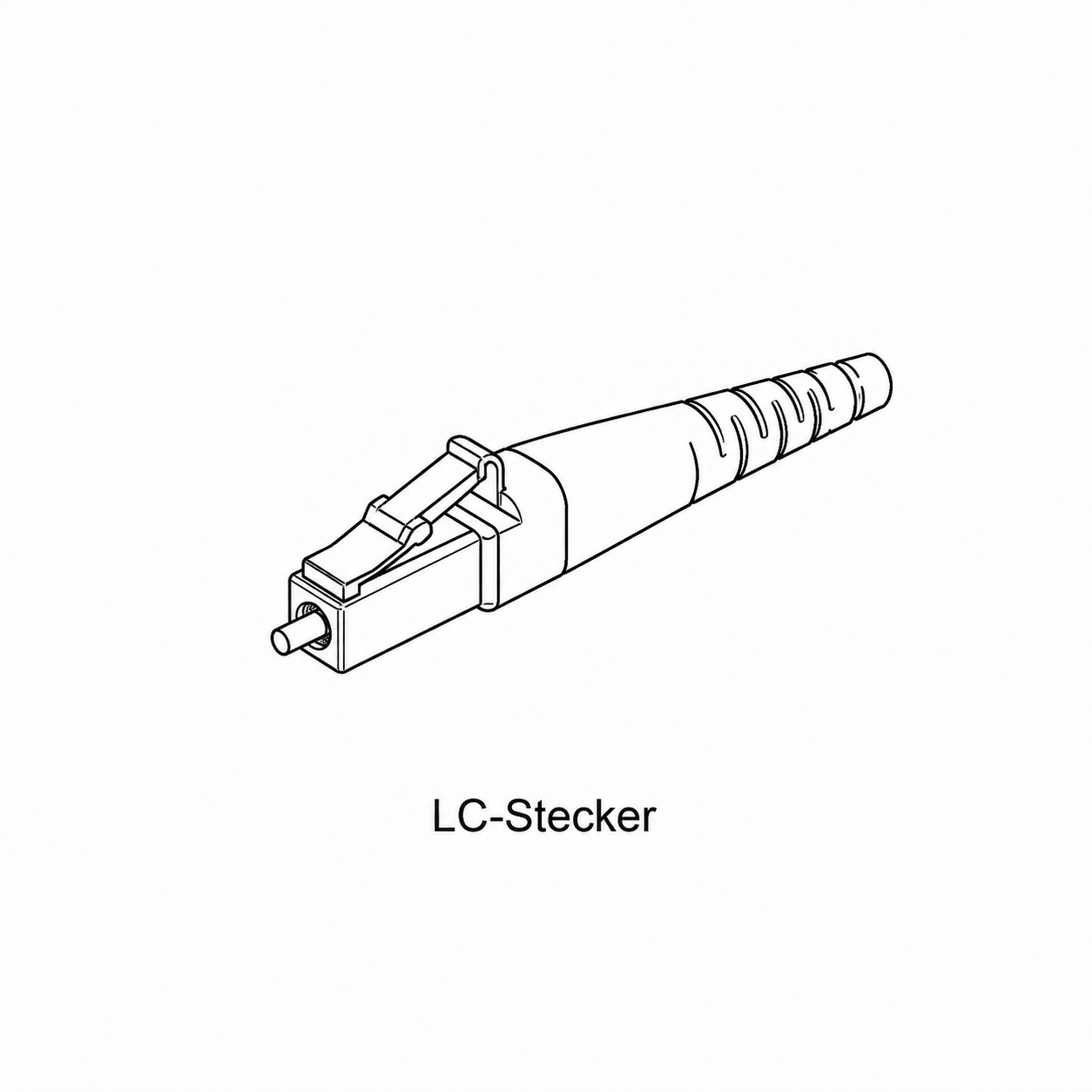
LC has a 1.25 mm ferrule and a compact locking mechanism. LC is used on the device side of various fibre optic routers and fibre modules.
SC has a 2.5 mm ferrule and a push-pull mechanism. SC/APC is frequently found on fibre-optic junction boxes, GF-TA units, handover points and other FTTH components.
The router or fibre module and the GF-TA or fibre optic socket both have an LC/APC connection.
Typical solution:
The router or fibre module has an LC/APC connector, whilst the existing fibre optic socket or GF-TA has an SC/APC connector.
Typical solution:
Suitable APC adaptors and couplers can be used for existing installations, extensions or specific connection combinations.
Examples:
For FRITZ!Box Fiber models with the corresponding FRITZ!SFP modules, LC/APC is used on the module side. The type of cable required at the other end depends on the existing fibre-optic connection box.
The fibre SFP modules have an LC/APC socket on the fibre side.
The fibre SFP modules designed for the FRITZ!Box 5590 Fiber also use LC/APC.
Even with other routers, gateways, SFP-ONTs and media converters, you should not base your selection on the product name alone. Check the actual optical socket or the fibre module used.
In addition, the device must support the optical access technology used by the network operator.
No. These terms describe two different things:
A router with an integrated fibre-optic modem or a suitable fibre module is connected directly to a GF-TA or fibre-optic connection box.
This requires an OS2 single-mode connection cable with suitable connectors at both ends.
With a separate ONT, the optical connection ends at the Optical Network Terminal.
An Ethernet network cable then normally runs from the ONT to the router’s WAN port.
FTTH and FTTB connections are typically based on single-mode fibre. The DINIC patch cables for fibre-optic routers therefore use OS2 9/125 µm.
OM3 and OM4, on the other hand, are multimode fibre classes intended for other network and data centre applications and should not be used as a substitute for an OS2 FTTH patch cable.
Adapters and couplers can complement existing fibre-optic installations. They are useful, for example, for:
View DINIC APC adaptors & couplers »
The length depends on the actual cable route between the fibre-optic connection box or GF-TA and the router or ONT. DINIC router connection cables are available in various lengths up to 50 m, depending on the series.
The FRITZ!SFP fibre module uses LC/APC. If the fibre optic socket also has LC/APC, an LC/APC to LC/APC connection is typically required. If the fibre socket is SC/APC, an LC/APC to SC/APC cable is used. In addition, the fibre module must be compatible with the provider’s network technology.
Here, too, the fibre SFP module has an LC/APC socket. The type of connector required at the other end of the cable is determined by the existing fibre-optic connection socket.
This is determined by the connection on the fibre-optic junction box or the GF-TA. If both ends are LC/APC, an LC/APC to LC/APC connector is used. If the router has LC/APC and the GF-TA has SC/APC, an LC/APC to SC/APC connector is required.
LC is smaller and has a compact latching mechanism. SC is larger and uses a push-pull design. The images above show a direct comparison of both connectors.
APC stands for Angled Physical Contact and refers to an angled polish on the fibre end face. APC connectors are usually marked in green and are frequently used in single-mode FTTH connections.
APC and UPC should not be connected directly to one another. The fibre end faces have different geometries and are not optically designed to be used in combination.
Green is usually used to indicate APC. When ordering, however, you should always check the technical designation of the connector and not base your decision solely on the colour.
OS2 single-mode fibre is used for typical FTTH/FTTB connections. OM4 is a multimode fibre intended for other network applications and should not simply be used in place of an OS2 router connection cable.
The optical connection is required up to the ONT. The router itself is usually connected behind a separate ONT via Ethernet using its WAN port.
Yes, provided the fibre type, connector and end face match. Suitable couplers can be used for this. However, a single, sufficiently long cable is usually neater and avoids additional optical connection points.
No. In addition to a mechanically compatible cable, the router or the fibre module used must also support the optical access technology employed by the network operator.
In principle, a suitably longer OS2 connection cable can be used. It is important to ensure the cable is routed correctly without kinks, to use suitable connectors, and to follow the specifications of the router and network operator.
OS2 simplex connection cables with LC/APC and SC/APC connectors, as well as suitable APC adaptors for fibre routers, ONTs, GF-TAs and professional FTTH/FTTB installations.
Which fibre-optic cable for which router? LC/APC, SC/APC & FTTH explained simply
Quick guide: Which fibre-optic cable do I need?
LC/APC or SC/APC – which connector do I have?
LC – compact
.png)
SC – larger and easy to grip
Which cable combination is suitable for my fibre-optic connection?
LC/APC → LC/APC
OS2 · Simplex · LC/APC 8° to LC/APC 8°
LC/APC → SC/APC
OS2 · Simplex · LC/APC 8° to SC/APC 8°
Adapter or coupler
LC/APC–LC/APC or LC/APC–SC/APC
Router, GF-TA or ONT – where does the fibre end?
Installation
Router page
Fibre-optic side
Typical connection
Direct fibre-optic router
LC/APC
GF-TA LC/APC
OS2 LC/APC → LC/APC
Direct fibre-optic router
LC/APC
GF-TA SC/APC
OS2 LC/APC → SC/APC
Router behind ONT
Ethernet WAN
Fibre ends at the ONT
ONT → Router, usually via Ethernet
Extend the existing APC cable
depending on the connection
depending on the connection
Check for a suitable APC connector
UPC/PC connection available
Check on a case-by-case basis
UPC / PC
Do not automatically use APC
Which fibre-optic cable for the FRITZ!Box Fiber?
FRITZ!Box 5530 Fiber
FRITZ!Box 5590 Fibre
Other fibre-optic routers
AON, GPON and XGS-PON – are these the same as LC or SC?
Direct fibre-optic router or router behind an ONT?
Router connected directly to the fibre-optic line
Router behind an ONT
Why use OS2 single-mode for FTTH and fibre routers?
When is a fibre-optic adapter useful?
What cable length do I need between the fibre-optic terminal and the router?
Before ordering: check these four points
Check whether the fibre-optic cable actually leads to the router or ends at the ONT.
the router side
Which connector is on the router or fibre module – for example, LC/APC?
the fibre terminal (GF-TA) / fibre socket
Check whether it is LC or SC, and also whether it supports APC or UPC/PC.
network technology
The router or fibre module must support AON, GPON, XGS-PON or whichever technology the network operator uses.
Frequently asked questions about fibre-optic cables for routers
Which fibre-optic cable do I need for the FRITZ!Box 5590 Fiber?
Which fibre-optic cable do I need for the FRITZ!Box 5530 Fiber?
LC/APC to LC/APC or LC/APC to SC/APC?
How can I tell the difference between LC and SC?
What does APC stand for?
Can I connect APC and UPC together?
Is a green connector automatically an APC?
Can I use OM4 for my fibre-optic router?
Do I need a fibre-optic cable if I have an ONT?
Can I extend the fibre-optic cable to the router?
Is every fibre-optic router compatible with every FTTH connection?
Can I position the router further away from the fibre-optic socket?
Selecting the right DINIC fibre-optic cable for routers and FTTH

B2B shop Retail, Trade & Industry
 German / Deutsch
  English
  French / Français
  Spanish / Español
  Dutch / Nederlands
  Italian / Italiano
  Polish / Polski
  Norwegian / Norsk
  Danish / Dansk
  Finnish / Suomi
  Swedish / Svenska
  Czech / Česky
  Greek / Ελληνικά
  Slovak / Slovenčina
  Slovenian / Slovenščina
  Estonian / Eesti
  Latvian / Latviešu
  Lithuanian / Lietuvių
  Hungarian / Magyar
  Romanian / Română
  Bulgarian / Български
  Portuguese / Português
The most important rule: do not order based on the router model alone. Always check both ends of the connection: the router or fibre module on one side and the GF-TA or fibre optic junction box on the other.
Router connected directly to fibre Router/fibre module: LC/APC ↓ Fibre connection box: LC/APC ↓ Required: OS2 Simplex LC/APC → LC/APC
Router connected directly to fibre Router/fibre module: LC/APC ↓ Fibre connection socket: SC/APC ↓ Required: OS2 Simplex LC/APC → SC/APC
Separate ONT present: Fibre ends at the ONT ↓ Router: WAN / Ethernet ↓ Required: normally a network cable from ONT → Router
Is there an ONT? If so, the router is not usually connected directly to the fibre optic cable. The optical cable runs to the ONT or fibre optic modem. An Ethernet cable is then usually used to connect the ONT to the router’s WAN port.
Key point: LC and SC refer to the connector type. APC, on the other hand, refers to the angled polish of the optical contact surface. This is why, for example, LC/APC and LC/UPC are not technically the same, despite both having the same LC connector type.
CASE 1
CASE 2
CASE 3
Do not connect APC and UPC directly to each other. The contact surfaces have different geometries. The connector shape and polish must therefore be checked at both ends of the connection.
The router model alone is not enough: even if the router side uses LC/APC, the GF-TA may have a different connector type depending on the network operator and installation. Therefore, always check both the router side and the fibre optic socket.
AON (Active Optical Network) – an optical network architecture or transmission technology.
GPON / XGS-PON – Passive Optical Network technologies for fibre-optic access networks.
LC / SC / APC: mechanical connector design or the polish of the optical contact surface.
Mechanical compatibility does not automatically mean technical compatibility. An LC/APC cable may fit perfectly into a router and fibre-optic socket – however, the router or fibre module must still support the fibre-optic technology used by the network operator.
OM3, OM4 or OS2? Compare multimode and single-mode fibres, as well as typical applications in data centres, building networks and FTTH. LC, SC or ST? Connector types, ferrules, simplex, duplex, as well as APC and UPC explained in detail. Fibre-optic connection routers: All DINIC OS2 connection cables and APC adaptors for routers, ONTs, GF-TAs and FTTH.
Where possible, use a cable that fits directly: a single, continuous cable with the correct connectors at both ends avoids additional optical connection points and usually results in a neater installation.
For the FRITZ!Box Fiber: FRITZ! points out that, due to the comparatively low attenuation, the cable length within a standard home connection is usually of secondary importance. More important are undamaged cables, correct connectors and neat installation.
1 Direct router or ONT?
2 Determine
3 Identify
4 Check