
 German / Deutsch
  English
  French / Français
  Spanish / Español
  Dutch / Nederlands
  Italian / Italiano
  Polish / Polski
  Norwegian / Norsk
  Danish / Dansk
  Finnish / Suomi
  Swedish / Svenska
  Czech / Česky
  Greek / Ελληνικά
  Slovak / Slovenčina
  Slovenian / Slovenščina
  Estonian / Eesti
  Latvian / Latviešu
  Lithuanian / Lietuvių
  Hungarian / Magyar
  Romanian / Română
  Bulgarian / Български
  Portuguese / Português
 USB-C to USB-C cable
Suitable USB-C cables for smartphones, tablets, laptops and peripherals: at MAG, specialist retailers, system integrators and businesses can find DINIC USB-C to USB-C cables for charging and data transfer. Depending on the model, the range includes cables rated at up to 60 W or 100 W, USB 2.0 or up to 20 Gbit/s, as well as versions with a nylon sheath and 90° angled connectors. The lengths on offer range from 0.15 to 3 m, depending on the series.
USB-C charging and data cable, 1 m, with up to 60 W / 3 A and USB 2.0 at up to 480 Mbit/s.
HQ USB-C cable, 1 m with nylon sheath, up to 100 W / 5 A and up to 20 Gbit/s.
Angled USB-C cable, 1 m with aluminium connector housings, nylon sheath and up to 60 W.
Check charging, data and video separately: The achievable performance depends on the cable, connectors and end devices. For monitors and docking stations, the required video function must be explicitly supported.
USB-C to USB-C cables with 60 W or 100 W from DINIC
60 W: Charging and synchronisation
100 W and high-speed data
90° for tight connection spaces

Which USB-C to USB-C cable suits your needs?
First, choose based on charging power, data transfer rate and, where applicable, video transmission. Next, consider cable length, connector type and packaging. Two USB-C cables that look similar on the outside may be designed for different tasks.
| Application | Suitable DINIC cable | Technical classification |
|---|---|---|
| Charging and data transfer | USB-C to USB-C, 1 m, black | Up to 60 W / 3 A; USB 2.0 up to 480 Mbit/s; polybag. |
| Nylon sheath and aluminium plug | HQ USB-C cable, 1 m, Space Grey | Up to 60 W; USB 2.0 up to 480 Mbit/s; promotional box. |
| Angled cable routing | USB-C cable with 90° angled plug, 1 m | Up to 60 W; USB 2.0 up to 480 Mbit/s; nylon sheath. |
| High data transfer rates and laptop charging | High-quality USB-C cable, 1 m, black | Up to 20 Gbit/s and 100 W / 5 A; nylon sheath and metal plug. |
| Data, charging and USB-C video | USB-C cable, 1 m, white | Up to 20 Gbit/s, 100 W / 5 A and DisplayPort Alt Mode; compatible devices required. |
| Charging over longer distances | USB-C charging cable, 3 m, black | Up to 60 W / 3 A; USB 2.0 data transfer; polybag. |
60 W or 100 W: Check charging requirements
For USB Power Delivery, the power adaptor, cable and device must be compatible. The linked 60 W/3 A cables are suitable for the corresponding charging profiles. The 100 W/5 A models support up to 20 V / 5 A and offer sufficient headroom for compatible laptops.
As well as the wattage, check the device’s required current and charging protocol. You can find suitable power sources under USB charging adapters.
480 Mbit/s or 20 Gbit/s?
USB 2.0 is suitable for synchronising and simple data connections. For large files or fast external storage, choose a version with a correspondingly higher data rate.
Speeds of up to 20 Gbit/s are only achieved if both the computer connection and the end device support USB 3.2 Gen 2x2. A faster cable does not increase the speed of a slower port.
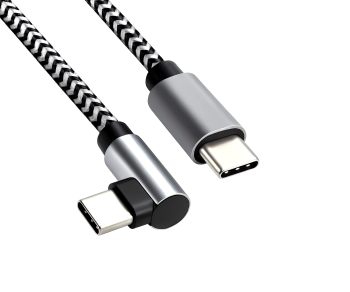
Short USB-C cables and 90° angled plugs
An angled plug can make it easier to route the cable around mounts or in tight spaces around ports. Check the product image to ensure the orientation fits your device and that neighbouring ports remain accessible.
For very short connections, there is a USB-C angled cable measuring 0.15 m and supporting up to 60 W. Whatever the length, ensure there is sufficient freedom of movement without putting strain on the device’s socket.
USB-C cables for monitors and docking stations
For video, you’ll need a cable designed for this purpose, a USB-C port with video output, and a compatible monitor or suitable docking station. The white 1-metre model linked above supports DisplayPort Alt Mode. A high wattage rating alone does not guarantee video functionality.
The guide ‘Which monitor cable do I need?’ will help you choose the right connection. ‘Choosing the right USB-C cable’ explains charging power, data rates and electronic cable labelling.
Cable sets, packaging and counter displays for B2B
For workstations that change frequently, the 3-piece set includes 0.5 m, 1 m and 2 m HQ cables with up to 100 W and 20 Gbit/s. Individual items are available, depending on the version, in a polybag, in a DINIC box with Euro-hole or in a promotional box. The packaging overview helps with selection.
For specialist retailers, there are counter displays containing 30 USB-C cables (1 m) and a display variant with 30 angled cables, each suitable for charging applications up to 60 W.
Frequently asked questions about USB-C to USB-C cables
Can I also use a 100 W cable for a smartphone?
Yes, provided the USB-C ports match and the charging source is compatible. The wattage specification describes the maximum power supported by the cable. The smartphone draws the power negotiated with the charger.
Are the cables suitable for iPhones and iPads?
For models with a USB-C port, choose a cable that suits your desired charging and data transfer requirements. For devices with a Lightning port, you’ll need Lightning cables.
Do the cables work with Android Auto and Apple CarPlay?
This requires a compatible smartphone, a suitable infotainment system and a USB-C data port in the vehicle. A charging port alone is not sufficient. Please follow the vehicle manufacturer’s specifications.
USB-C cables for equipment, service and retail
Please let us know the required charging power, data rate, video functionality, cable length, quantity and packaging. MAG will assist you in selecting suitable DINIC USB-C cables for your B2B requirements.
Send a B2B enquiry to MAGYou can find further connection terms in the Cable Glossary for B2B.