
 German / Deutsch
  English
  French / Français
  Spanish / Español
  Dutch / Nederlands
  Italian / Italiano
  Polish / Polski
  Norwegian / Norsk
  Danish / Dansk
  Finnish / Suomi
  Swedish / Svenska
  Czech / Česky
  Greek / Ελληνικά
  Slovak / Slovenčina
  Slovenian / Slovenščina
  Estonian / Eesti
  Latvian / Latviešu
  Lithuanian / Lietuvių
  Hungarian / Magyar
  Romanian / Română
  Bulgarian / Български
  Portuguese / Português
 IEC 60320 plugs for cold and warm-run equipment
IEC 60320 appliance plugs – C5, C7, C13, C15, C17, C19 and C21 at a glance
Which IEC 60320 appliance plug fits which appliance socket? This overview provides a direct comparison of the most important cold, warm and hot appliance sockets: from C7/C8 and C5/C6 through to C13/C14, C15/C16 and C17/C18, right up to C19/C20 and C21/C22.
IEC 60320 connectors are used worldwide in PCs, monitors, servers, network devices, UPS systems, PDUs, power supplies, as well as in industrial, laboratory and media technology. When selecting the correct connection cable, in addition to the IEC form factor, particular attention must be paid to the protective conductor, current-carrying capacity, temperature requirements, cable cross-section, cable length, country-specific plugs and any necessary approvals.
If the device connection is already known, the MAG power cable finder for C5, C7, C13, C15 or C19 leads directly to suitable connection cables and then helps with the selection of country-specific plugs, length and other specifications.
Go to the power cable finderMains plugs and IEC appliance plugs – two sides of a power cable
In a complete power cable, the mains side and the appliance side must always match. The IEC designations C5, C7, C13, C15 or C19 describe the appliance side and not the country-specific mains plug.
UK Type G or NEMA
Approval · design
C13, C15 or C19
For international projects, the appliance connection must therefore be determined first, and then the mains plug suitable for the destination country selected. Compare mains plugs worldwide →
Quick answer: Which IEC plug fits which socket?
For these pairs, the odd-numbered plug typically refers to the appliance socket on the connecting cable. The even-numbered plug refers to the matching male counterpart, which is often designed as an appliance plug.
4 steps to finding the right IEC 60320 connection
IEC 60320 Quick Comparison
The table shows the IEC systems particularly relevant for connection cables. Current ratings refer to the respective international IEC family. The actual load capacity of a complete connection cable may also be limited by the cable cross-section, mains plug, length and product-specific approvals.
| IEC system | Connector on the cable | Appliance connection | Protective conductor | IEC current class | Typical application |
|---|---|---|---|---|---|
| C7 / C8 | C7 | C8 | No | 2.5 A family | Small appliances, power supplies, audio/video |
| C5 / C6 | C5 | C6 | yes | 2.5 A series | Laptop power adapters, projectors |
| C13 / C14 | C13 | C14 | Yes | 10 A range | PC, monitor, printer, switch, server |
| C15 / C16 | C15 | C16 | yes | 10 A family | Heating equipment, laboratory, elevated temperature |
| C17 / C18 | C17 | C18 | no | 10 A series | Two-pole devices without a protective conductor |
| C19 / C20 | C19 | C20 | yes | 16 A range | Servers, PDUs, UPSs, storage, industrial |
| C21 / C22 | C21 | C22 | yes | 16 A family | Heating appliances, laboratory, special applications |
Note: IEC 60320 covers appliance plugs and sockets rated up to 250 V AC and a maximum of 16 A. When selecting a specific cable, the technical data and approvals for the respective product are always decisive.
Which IEC connector is used for which appliance?
The design of the existing appliance is always the determining factor. The following overview is therefore intended only as a quick guide for common applications.
| Device / Application | Common device connection | Matching connector on the cable |
|---|---|---|
| Laptop power supply, projector | C6 | C5 |
| TV, audio, smaller power adapters | C8 | C7 |
| PC, monitor, printer | C14 | C13 |
| Switch, server, network device | frequently C14 | C13 |
| Devices with increased temperature requirements | C16 | C15 |
| Two-pole devices without PE | C18 | C17 |
| High-performance servers, PDUs, UPSs | C20 | C19 |
| Applications with particularly demanding thermal requirements | C22 | C21 |
C13, C15 and C17 look similar – but they are not the same
C13, C15 and C17 are particularly often confused with one another. C13 and C15 have an earth contact, whilst C17 is a two-pin connector without an earth contact. C15 also features the mechanical shape-coding for the C16 hot-appliance connection.
- C13 → C14: standard connection for low-voltage equipment
- C15 → C16: standard hot appliance connection
- C17 → C18: standard two-pole connection without PE
- C15 → C14: mechanically possible
- C13 → C16: not mechanically possible
- C13 → C18: mechanically possible
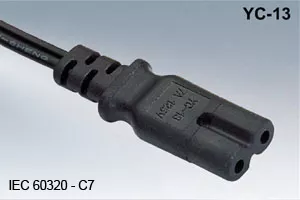
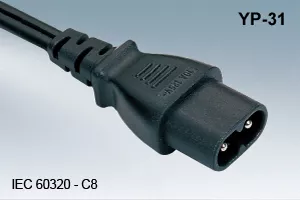
IEC 60320 C7 / C8 – ‘Eight’ small appliance connection
The C7 appliance connector is two-pole and has no protective earth conductor. Its standard counterpart is the C8 appliance connector. The system is frequently used in insulation-protected small appliances, power supplies, audio/video equipment and compact electronics.
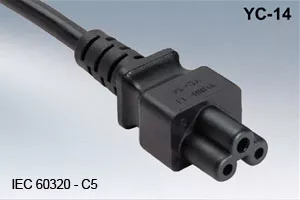
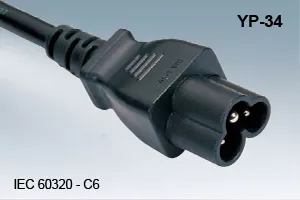
IEC 60320 C5 / C6 – cloverleaf connector with protective earth
The C5 appliance connector is often referred to as a ‘cloverleaf’ plug due to its shape. It features a protective earth conductor and is frequently used in laptop power adaptors, projectors and compact IT devices. The matching counterpart is IEC C6.
IEC 60320 C13 / C14 – classic low-voltage equipment connection
C13/C14 is one of the most widely used IEC 60320 systems in IT, office, network and data centre environments. The C13 equipment socket is typically located on the connection cable and is connected to a C14 equipment plug. Common applications include PCs, monitors, printers, switches and servers.
In the case of IEC extension cables, the male C14 connector may also be located on the cable end, for example in rack, PDU and server cabling.
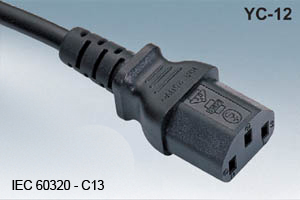
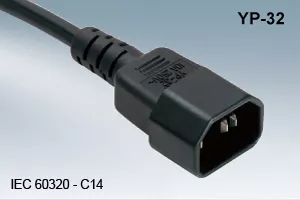
For C13/C14, SecureSleeve slip-on sleeves and IEC-LOCK connectors with mechanical locking are available, amongst other options.
Securing the mains cable against accidental disconnection →IEC 60320 C15 / C16 – Connection for heating appliances
The C15 hot appliance connector is very similar to the C13, but is designed for higher temperature requirements and features additional mechanical polarisation. The standard counterpart is the IEC C16.
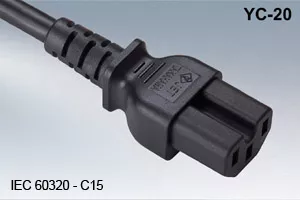
- C15 → C16: standard connection
- C15 → C14: mechanically possible
- C13 → C16: not mechanically possible
IEC 60320 C17 / C18 – two-pole without earth conductor
C17 is a two-pole appliance connector without a protective earth conductor. Its standard counterpart is IEC C18. This version is used in appliances designed accordingly that do not require a protective earth connection.
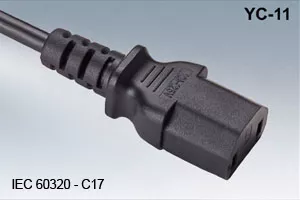
- C17 → C18: standard connection
- C17 → C14: does not fit
- C13 → C18: mechanically possible
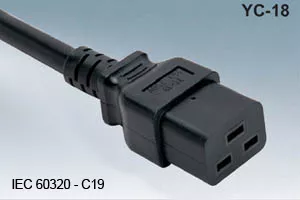
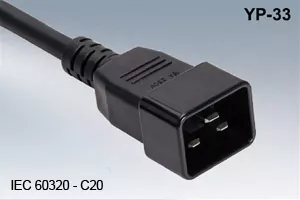
IEC 60320 C19 / C20 – 16 A system for servers, PDUs and UPSs
C19/C20 forms part of the 16 A IEC family and is used for higher-power devices and power distribution. Typical applications include servers, storage systems, UPS systems, PDUs, data centres and industrial installations.
View SecureSleeve and IEC-LOCK →
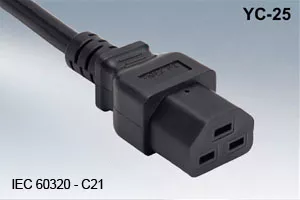
IEC 60320 C21 / C22 – Hot-swappable device connection
The C21 equipment coupler also belongs to the 16-A family, but is designed for higher thermal requirements than C19/C20. Its standard mating connector is IEC C22. Typical applications include laboratories, industry and thermally demanding specialist applications.
Cold-use, warm-use or hot-use?
Similar dimensions do not automatically mean the same applications. The IEC systems differ, amongst other things, in terms of their temperature class and therefore sometimes have deliberately different mechanical codes.
| IEC system | Class | Typical application |
|---|---|---|
| C13 / C14 | IT equipment | IT, office, network, server |
| C15 / C16 | Hot equipment | Applications with higher temperature requirements |
| C19 / C20 | Cold equipment / 16 A family | Servers, PDUs, UPSs, high-power equipment |
| C21 / C22 | Hot equipment / 16 A family | High thermal requirements |
Common mistakes when selecting IEC 60320 connection cables
Frequently asked questions about IEC 60320 appliance plugs
With the Power Cable Finder, you can go directly from the IEC connector to suitable power cables and then select the mains plug and version.
Open the Power Cable FinderSuitable power cables, extension leads and IEC accessories
Further selection guides
Custom-made IEC equipment cables and power cables
In addition to its standard range, MAG GmbH manufactures project-specific DINIC mains cables and equipment cables, for example with custom lengths, cross-sections, colours, plug combinations and country-specific mains plugs.
For a quick project assessment, the following details are particularly helpful: IEC type, country-specific plugs, cable length, cable cross-section, quantity and area of application.
Cable Assembly & Custom-made ProductsTechnical note: This overview assists with the selection and differentiation of IEC 60320 connectors. Before replacing or selecting a connection cable, the equipment manufacturer’s technical specifications as well as the requirements regarding voltage, current, temperature, cable cross-section and necessary approvals must be taken into account. Connectors must not be mechanically modified or forced into place.